Showing posts with label #adf. Show all posts

Wednesday, 19 August 2020

ADF application gives error while running it on the Production Server

Problem: Oracle ADF application is running fine when I am running it on my local system, but when i deploy the application on the Production Server then the application crashes.

Error log:

<Error> <org.apache.myfaces.trinidad.webapp.UIXComponentELTag> <BEA-000000> <Error when processing tag for component with id: "ot7". The scoped id of the parent component is ":r1:pc1:t1:c1".
javax.faces.FacesException: javax.el.PropertyNotFoundException: Target Unreachable, 'null' returned null
    at com.sun.faces.application.ApplicationImpl.createComponentApplyAnnotations(ApplicationImpl.java:1952)
    at com.sun.faces.application.ApplicationImpl.createComponent(ApplicationImpl.java:447)
    at javax.faces.webapp.UIComponentELTag.createComponent(UIComponentELTag.java:222)
    at org.apache.myfaces.trinidad.webapp.UIXComponentELTag.createComponent(UIXComponentELTag.java:225)
    at javax.faces.webapp.UIComponentClassicTagBase.createChild(UIComponentClassicTagBase.java:506)
    at javax.faces.webapp.UIComponentClassicTagBase.findComponent(UIComponentClassicTagBase.java:744)
    at javax.faces.webapp.UIComponentClassicTagBase.doStartTag(UIComponentClassicTagBase.java:1311)
    at org.apache.myfaces.trinidad.webapp.UIXComponentELTag.doStartTag(UIXComponentELTag.java:115)
    at oracle.adfinternal.view.faces.unified.taglib.output.UnifiedOutputTextTag.doStartTag(UnifiedOutputTextTag.java:55)
    at oracle.jsp.runtime.tree.OracleJspBodyTagNode.executeHandler(OracleJspBodyTagNode.java:50)
    at oracle.jsp.runtime.tree.OracleJspCustomTagNode.execute(OracleJspCustomTagNode.java:263)
    at oracle.jsp.runtime.tree.OracleJspClassicTagNode.evalBody(OracleJspClassicTagNode.java:87)
    at oracle.jsp.runtime.tree.OracleJspBodyTagNode.executeHandler(OracleJspBodyTagNode.java:58)
    at oracle.jsp.runtime.tree.OracleJspCustomTagNode.execute(OracleJspCustomTagNode.java:263)
    at oracle.jsp.runtime.tree.OracleJspClassicTagNode.evalBody(OracleJspClassicTagNode.java:87)
    at oracle.jsp.runtime.tree.OracleJspBodyTagNode.executeHandler(OracleJspBodyTagNode.java:58)
    at oracle.jsp.runtime.tree.OracleJspCustomTagNode.execute(OracleJspCustomTagNode.java:263)

Possible solutions: There can be two possible reasons of this error. 

1. PPR (Partial Page Rendering) 

PPR stands for Partial Page Rendering and it as used in oracle ADF to refresh some particular part of the page if some data changes on the page or on trigger event. This helps in optimizing the performance of the application as for data refresh the whole page is not loaded, instead some part of the page which is required to be refreshed is loaded. But there are some bugs in ADF due to which this behaves in strange way. If this is the cause then you can resolve this issue by disabling PPR in the Page or in the Application. 

Caution: This may lead to another issues related to component refresh on the page as this disables the automatic refresh, you may have to write some code to refresh the page at certain point. While doing this it is must to check if all the functionality of the application is working as it is supposed to be or not. 

How to disable PPR?? 

PPR can be disabled from two levels.

  1. Application Level: By diabling PPR at Application level this is default properties of all the pages. This can be done in the adf-config file.


  2. Page Level: This can be done to the iterators of the in the pagedef of the page.


2. PageDef Filename conflict

If we are running an application is production environment and if two application has pageDef, page name, taskflow name, package name same then this error comes up. This majorly comes up due to same pageDef name.

So when you run you application then the clash doesn't happen, but when your is running it with all other applications then this conflict happens and the framework is confused which file to consider for the page. In that case this issue comes up.

Solution:

Rename the pageDef or page for which this issue is coming by clicking on the refactor in the JDeveloper.

How to avoid this??

Make sure that all the applications are having a different package name. This will avoid this condition.

I will try to update this post with actual error log which comes up in case of PageDef conflict..

Tuesday, 17 December 2019

ADF ViewObject loading a huge number of records in the memory? Why? How this can be stopped?

View object loading an unnecessary no. of rows in the memory can be a strong reason for causing performance-related issues in oracle ADF applications. There are many scenarios where the rows are being loaded in the memory unintentionally. As too many rows are loaded into the memory this will lead to slow application performance.

There can be many reasons due to which this is happing.

1. The wrong List of Values used.

        a. There are several types of LOV's that are defined in ADF.
        b. Each has different usage depending on the use case.
        c. To explain the point above I will only talk about two, i.e. af:InputListofValues (Lens Lov) and af:selectOneChoice (Dropdown LOV).
        d. af:InputListofValues(Lens LOV): These LOV's are used where the user has to select a value from a very large no. of options. Users can narrow down the list by search and filter and then select the record. This type of LOV loads a small no. of rows (Max 10 Default Query Limit) in the system List of Values Properties in the ViewObject.

ADF af:InputListOfValues

       
        e. af:selectOneChoice (Dropdown LOV): These LOV's are used where the user has to select the value from a small no. of Options lets say 5 to 10. In this case, all the records are displayed on the page and there is not Query Limit by Default.

ADF Single Selection LOV

        f. So if during the implementation if in case if no. of values is large and single selection Lov is used then a large no. of rows will be loaded in the memory and will lead to slow application loading.


2. Range of Table set to -1 which means all the rows that are loaded from view object query.


The default range of a view object if dropped on the Page is 25 that means 25 rows will be loaded into memory if that view Object is page is rendered. If the range size is changed to  -1 than all the rows in the view object will be loaded in the memory on the first request and if there are large no. of rows returned from the view object Query then it will take time to load. As per my experience, it is never advised to set the range size of a table to -1.    


oracle ADF Table


3. Use of getFilteredRows or RowQualifier for in-memory filtration in the Application.

        a. getFilteredRows or RowQualifier are used for filtering the rows of the view object programmatically.
        b. These are in-memory filtration, i.e. first all the rows will be loaded in the memory and then filtration will be done.
        c. But this filtration is done in the memory, and if the is being done on a view object which has a large no. of rows then all the rows will be first loaded into the memory which will lead to slow application processing.


How to identify the view object which is loading huge no. of Rows.

ADF shows all the model layer activities using oracle.jbo logger and by setting it to finest we can see minute details of the processes that are being executed when the application is running.
How to enable the logger? I have mentioned the steps to enable the logger in this post ->
Performance-related issues in oracle ADF? How to Identify long-running queries of View Object?

Now run the application and open the logger window and while application is loading see the log. It will show the queries which are being executed. If the log is stuck at some query and the log shows something like this.


The line "$$added root$$ id=-2" means that the Application is loading all the rows of the view object of the above query. 


Solution.

1. First identify the view object or Lov which is loading large no. of rows.
2. Check the references of the view object, where they are used and how they are used.
3. Check if the view object is used for in-memory filtration or not. If yes, then check how many rows are being loaded into memory and why they are being loaded in the memory. Maybe there is any issue in implementation logic due to which this is happening.

 
If you have any questions or queries related to the above blog, please feel free to ask. :)

Saturday, 14 December 2019

Performance-related issues in oracle ADF? How to Identify long-running queries of View Object?

The long-running query can be an important reason for the poor performance of the oracle ADF Application. The main point is how to identify that query in an ADF Application.

My ADF application was working fine earlier, but now it is slow. What's the reason??

My view object query is working fine in the database but when I am running in the ADF Application it is running slow? Why??

The above are the common question? Right?

The best way to identify a slow query is through the ADF logs. ADF shows all the model layer activities using oracle.jbo logger and by setting it to finest we can see minute details of the processes that are being executed when the application is running.

ADF logger is a very important tool that can be used in development for debugging. It provides mynute details that can be used to identifying the issues in the ADF applications. I provides you the runtime queries along with the parameters which are used to call the queries.

Here is how you can use the logger.
1. Open the Weblogic log and click on Configure Oracle Diagnostic Logging

oracle adf Weblogic log console

2. After that, the logger screen will open. Go to oracle.jbo logger and set the level to "Finest". The finest level log shows each and every activity which is being performed by the framework.


3. Finest log generates a large no. of rows, so for viewing the whole log we need to increase the log lines in preferences. Initially, it's 3000. Increase the limit to 300000.

Log prefefences in JDeveloper

4. Now when we run the Application (I have taken a sample app with Departments ViewObjects with a view criteria).

how to run an adf application

 5. After the application is started just check the log. Here you can see the query which is executed by the framework to fetch the data along with bind Variables.


How can this be used to identify the queries which are running slow??

Using log we can identify the long-running queries.
1. Run the application and when the application is loading or performing some action which is slow check the log.
2. If the log is stuck at some query for a longer time as shown above in the screenshot, then make a note and thats the query you need to work upon.


Thanks

If you have any queries related to the above blog, feel free to ask. :)


Sunday, 21 April 2019

ADF | Line 1 column 18. When does this error comes up.


Error Description: Line 1 column 18

Cause: This error comes up when we call a database function from the ADF Application and that database function is uncompiled. The function may be uncompiled due to some error in the database function.

Corrective Action: You just have to open the database function and fix the error in the database function. Once the function is compiled this error will not appear again.

Friday, 16 March 2018

Automatic Refresh table data in Oracle ADF


Hi,

Today I am going to post about how we can automatically refresh a table on particular time interval. For this we will be using af:poll component.

Let us start by simply creating a sample application with hr Schema.

And then drop a viewObject as a table on a page.

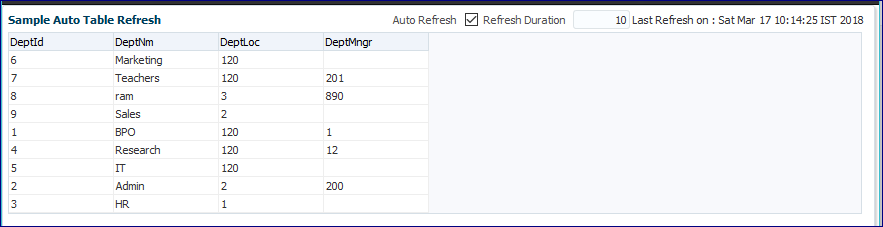
Here is the page.


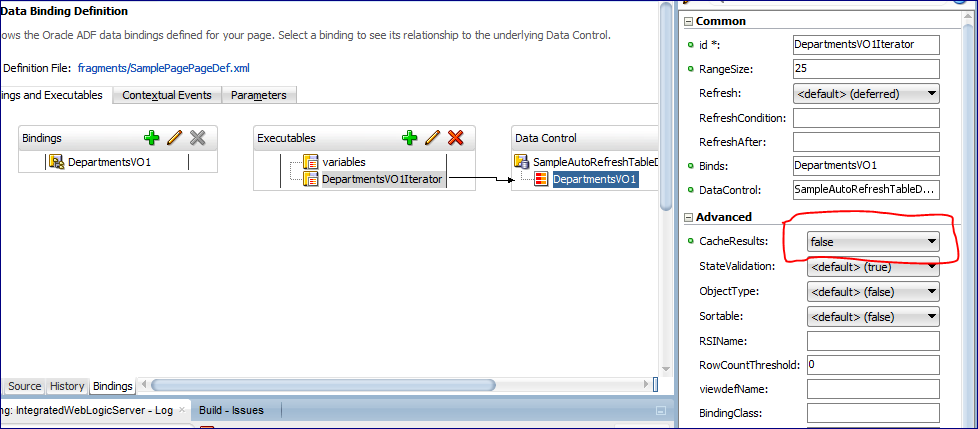
Correction : To refresh the table on every refresh we will have to disable the cache from the Table Iterator.[This step can pe skipped].


After that when we run the application.


 After that, we change the data in the database.


Then when a poll is called then the department name Admin changed to Admin New


Here is the code of the Page used in this project.


<af:panelBox text="Sample Auto Table Refresh" id="pb1" showDisclosure="false">
    <f:facet name="toolbar">
      <af:toolbar id="t2">
        <af:selectBooleanCheckbox label="Auto Refresh" id="sbc1"
                                  value="#{viewScope.smplPageRefreshBean.autoRefreshEnabled}"
                                  autoSubmit="true"/>
        <af:inputText label="Refresh Duration" id="it1" contentStyle="width:50px;"
                      value="#{viewScope.smplPageRefreshBean.refreshDuration}" autoSubmit="true"
                      partialTriggers="sbc1" visible="#{viewScope.smplPageRefreshBean.pollOn}"/>
        <af:outputText value="Last Refresh on : #{viewScope.smplPageRefreshBean.lastRefreshedOn}" id="ot5"
                       partialTriggers="sbc1 p1" visible="#{viewScope.smplPageRefreshBean.pollOn}"/>
      </af:toolbar>
    </f:facet>
    <af:panelGroupLayout id="pgl1" layout="vertical">
      <af:poll id="p1" interval="#{viewScope.smplPageRefreshBean.pollDuration}" partialTriggers="sbc1"
               pollListener="#{viewScope.smplPageRefreshBean.pollListner}"/>
      <af:table value="#{bindings.DepartmentsVO1.collectionModel}" var="row" rows="#{bindings.DepartmentsVO1.rangeSize}"
                emptyText="#{bindings.DepartmentsVO1.viewable ? 'No data to display.' : 'Access Denied.'}"
                rowBandingInterval="0" selectedRowKeys="#{bindings.DepartmentsVO1.collectionModel.selectedRow}"
                selectionListener="#{bindings.DepartmentsVO1.collectionModel.makeCurrent}" rowSelection="single"
                fetchSize="#{bindings.DepartmentsVO1.rangeSize}" id="t1" partialTriggers="::sbc1 ::p1" autoHeightRows="10"
                styleClass="AFStretchWidth">
        <af:column headerText="#{bindings.DepartmentsVO1.hints.DeptId.label}" id="c1">
          <af:outputText value="#{row.DeptId}" shortDesc="#{bindings.DepartmentsVO1.hints.DeptId.tooltip}" id="ot1">
            <af:convertNumber groupingUsed="false" pattern="#{bindings.DepartmentsVO1.hints.DeptId.format}"/>
          </af:outputText>
        </af:column>
        <af:column headerText="#{bindings.DepartmentsVO1.hints.DeptNm.label}" id="c2">
          <af:outputText value="#{row.DeptNm}" shortDesc="#{bindings.DepartmentsVO1.hints.DeptNm.tooltip}" id="ot2"/>
        </af:column>
        <af:column headerText="#{bindings.DepartmentsVO1.hints.DeptLoc.label}" id="c3">
          <af:outputText value="#{row.DeptLoc}" shortDesc="#{bindings.DepartmentsVO1.hints.DeptLoc.tooltip}" id="ot3">
            <af:convertNumber groupingUsed="false" pattern="#{bindings.DepartmentsVO1.hints.DeptLoc.format}"/>
          </af:outputText>
        </af:column>
        <af:column headerText="#{bindings.DepartmentsVO1.hints.DeptMngr.label}" id="c4">
          <af:outputText value="#{row.DeptMngr}" shortDesc="#{bindings.DepartmentsVO1.hints.DeptMngr.tooltip}" id="ot4">
            <af:convertNumber groupingUsed="false" pattern="#{bindings.DepartmentsVO1.hints.DeptMngr.format}"/>
          </af:outputText>
        </af:column>
      </af:table>
    </af:panelGroupLayout>

And in the Bean.


package sampleautorefreshtable.adfjavacodes.view.bean;

import java.util.Date;

import javax.faces.application.FacesMessage;

import oracle.adf.model.BindingContext;

import oracle.binding.OperationBinding;

import org.apache.myfaces.trinidad.event.PollEvent;

public class smplPageRefreshBean {
    // To decide if refresh is enabled or not
    private boolean autoRefreshEnabled = false;
    // To decide the last refreshed time
    private Date lastRefreshedOn = new Date(System.currentTimeMillis());
    // To decide refresh time interval in seconds
    private long refreshDuration = 10;
    // To set poll to on or off
    private boolean pollOn = false;

    public boolean isPollOn() {
        return pollOn;
    }

    public smplPageRefreshBean() {
    }

    public void setAutoRefreshEnabled(boolean autoRefreshEnabled) {
        if (autoRefreshEnabled) {
            pollOn = true;
            refreshDuration = 10;
        } else {
            pollOn = false;
        }
        this.autoRefreshEnabled = autoRefreshEnabled;
    }

    public boolean isAutoRefreshEnabled() {
        return autoRefreshEnabled;
    }

    public void setLastRefreshedOn(Date lastRefreshedOn) {
        this.lastRefreshedOn = lastRefreshedOn;
    }

    public Date getLastRefreshedOn() {
        return lastRefreshedOn;
    }

    public void setRefreshDuration(long refreshDuration) {
        this.refreshDuration = refreshDuration;
    }

    public long getRefreshDuration() {
        return refreshDuration;
    }

    public long getPollDuration() {
        return (pollOn ? refreshDuration * 1000 : -1);
    }

    public void pollListner(PollEvent pollEvent) {
        OperationBinding o = BindingContext.getCurrent().getCurrentBindingsEntry().getOperationBinding("Execute");
        o.execute();
        System.out.println("refreshed");
        lastRefreshedOn = new Date(System.currentTimeMillis());
    }
}

You can find the sample project here: SampleAutoRefreshTable

Thanks!

References : http://pamkoertshuis.blogspot.in/2016/01/auto-refresh-op-table-in-adf.html

Thursday, 17 December 2015

How to programmatically set Bind Variable in an LOV in ADF

Hello,

This is again a post about ADF Basics.

Today I am going to demonstrate a  how we can set bindVariable in an Lov programatically without using viewAccessor of the viewObject.

For the demonstration I have created a temporary viewObject and a department ViewObject through which Lov will be made.

I have created a TempVo with a Transient attribute EmployeeIdTrans on which lov of EmployeesVO will be created .
In the EmployeeVo I have created a viewCriteria as follows.


Then apply the Lov on the basis of this EmployeeVO in the TempVO.


In the viewAccessor of the lov Select the ViewCritera


Drag the EmployeeIdTrans on the Jspx page and create a single selection lov.
Then add a new Input text box from which we will fetch the value of the department on which the lov needs to be filtered.
Here is the code of the jspx page

 <af:panelBox text="Set BindVariable in an Lov Programmatically" id="pb1">
                    <f:facet name="toolbar"/>
                    <af:panelGroupLayout id="pgl1" layout="horizontal">
                        <af:inputText label="Department Id" id="it1"
                                      autoSubmit="true" value="#{viewScope.TestBean.deptId}"/>
                        <af:button text="Set Department Id" id="b1"
                                   actionListener="#{viewScope.TestBean.setLovBindVarAL}"/>
                    </af:panelGroupLayout>
                    <af:spacer width="10" height="10" id="s1"/>
                    <af:selectOneChoice value="#{bindings.EmployeeIdTrans.inputValue}"
                                        label="Employees"
                                        required="#{bindings.EmployeeIdTrans.hints.mandatory}"
                                        shortDesc="#{bindings.EmployeeIdTrans.hints.tooltip}" id="soc1"
                                        partialTriggers="b1">
                        <f:selectItems value="#{bindings.EmployeeIdTrans.items}" id="si1"/>
                        <f:validator binding="#{bindings.EmployeeIdTrans.validator}"/>
                    </af:selectOneChoice>
                </af:panelBox>

Then create a method in ApplicaitonModuleImpl that will set the value bindVariable and execute the lov and then call it in the bean.

 /**
     * Method to execute Lov with bind variables
     * @param deptId
     */
    public void setBindVarAndExceuteLov(Integer deptId){
        Row currentRow = getTemp1().getCurrentRow();
        RowSet lovVO = (RowSet)currentRow.getAttribute("EmployeesVO1");
        lovVO.setNamedWhereClauseParam("DeptIdBind", deptId);
        lovVO.executeQuery();
    }

You can refer this if you want to know how to call a method to ApplicationModuleImpl in Bean http://adfjavacodes.blogspot.com/2013/09/calling-method-defined-in-impl-class-of.html

Here is the code used in the Bean.


package bindvariableinlovapp.view;

import javax.faces.event.ActionEvent;

import oracle.adf.model.BindingContext;
import oracle.adf.view.rich.component.rich.input.RichInputText;

import oracle.binding.OperationBinding;

public class TestBean {
    private Integer deptId;

    public void setDeptId(Integer deptId) {
        this.deptId = deptId;
    }

    public Integer getDeptId() {
        return deptId;
    }

    public TestBean() {
    }

    public OperationBinding getBindings(String binding){
        return BindingContext.getCurrent().getCurrentBindingsEntry().getOperationBinding(binding);
    }
    public void setLovBindVarAL(ActionEvent actionEvent) {
        OperationBinding binding = getBindings("setBindVarAndExceuteLov");
        binding.getParamsMap().put("deptId", deptId);
        binding.execute();
    }

}

On running the application it shows all the departments.

On filtering with department Id 1.


Here is the sample application : ProgramaticValueOfBindVarInLovApp

Tuesday, 15 December 2015

ADF: Disabling Input Field for Date Component af:inputDate

Hello all,

This post is a basic post regarding a scenario in which we had to provide a date component and disable the inputField in af:inputDate component.

There are many ways to implement this scenario, this is one of those.
For the the demonstration, I have created a TemporaryVO and create a transient attribute with Timestamp dataType.

For the an implementation just drag the attribute and drop it as ADF input Date.


Surround the component with a af:panelLableWithMessage and then put an af:inputText component from the components section.

Then set the disable property of the inputText to true.
And then copy the value of the inputDate and paste it in the value of the input field.
Here is the xml code .

<af:panelLabelAndMessage label="New Date" id="plam1">
                        <af:panelGroupLayout id="pgl1" layout="horizontal">
                            <af:inputText label="Label 1" id="it1" simple="true" disabled="true"
                                          value="#{bindings.NewDateTrans.inputValue}"/>
                            <af:inputDate value="#{bindings.NewDateTrans.inputValue}"
                                          required="#{bindings.NewDateTrans.hints.mandatory}"
                                          columns="#{bindings.NewDateTrans.hints.displayWidth}"
                                          shortDesc="#{bindings.NewDateTrans.hints.tooltip}" id="id1" autoSubmit="true" simple="true"
                                          contentStyle="display:none;">
                                <f:validator binding="#{bindings.NewDateTrans.validator}"/>
                                <af:convertDateTime pattern="#{bindings.NewDateTrans.format}"/>
                            </af:inputDate>
                        </af:panelGroupLayout>
                    </af:panelLabelAndMessage>


That's it. Now run the application.

Here is the Sample Application for Reference : DateFieldTestApp