Showing posts with label adf table. Show all posts

Saturday, 10 January 2015

ADF : Tagged search / Filtering ViewObject using InClause in ADF

Hello all,

This post is about how we can search (filter) in a  given ViewObject using InClause  and make it look like tagged search. Suppose we want to make an application in which the user can select more than one Department and then view the Employees of the selected Departments. This is a simple Scenario in which you want to give tagged search to the user.


I have created an Application to implement the above scenario . Here is the Default screen.
  
Here we can Select a Department and press  Add Department Button then it will be added to the list. I Have added a couple of Departments here. You can see the Departments shown as tags ,then click on the Search for Selected Departments Button. Then you will see the Employees of the Selected Departments.

So now to start with the application we need HR schema with Departments and Employees table .

  1. Create an ADF Fusion Web Application.
  2. Create two ViewObject DepartmentVO and EmployeeVO.
  3. Then create a Temporary view Object name TempVO to use it for the purpose of searching.
  4. Attribute DeptIdTrans to store DepartmentId and DeptDescTrans to store Department Name.
  5. Then Create a Lov using DepartmentVO on DeptDescTrans and set DepartmentId to DeptIdTrans.
  6. Then create an ApplicationModule and add DepartmentVO and TempVO to the Application Module.
  7. Then create a bounded taskflow and  a page in it.
  8. Then create a jspx page and add the taskflow to the jspx page.
  9. Now comes the view part. Drag the EmployeesVO to the page and then drag DeptDescTrans and create a inputListOfValues.
  10. Then Create a Bean with an ArrayList where we can store the selected Departments.
  11. Then use an Iterator on the page to Display the Selected Departments
     package inclausesearch.view.bean;
     import inclausesearch.model.datatype.DeptInfo;
     import java.util.ArrayList;
     import javax.faces.application.FacesMessage;
     import javax.faces.context.FacesContext;
     import javax.faces.event.ActionEvent;
     import oracle.adf.model.BindingContext;
     import oracle.adf.share.ADFContext;
     import oracle.adf.view.rich.context.AdfFacesContext;
     import oracle.binding.BindingContainer;
     import oracle.binding.OperationBinding;
     
     public class InClauseSearchBean {
         private ArrayList<DeptInfo> selectedDepartments = new ArrayList<DeptInfo>();
     
         public void setSelectedDepartments(ArrayList<DeptInfo> selectedDepartments) {
             this.selectedDepartments = selectedDepartments;
         }
     
         public ArrayList<DeptInfo> getSelectedDepartments() {
             return selectedDepartments;
         }
     
         public InClauseSearchBean() {
             
         }
         
         public void addDeptToListAL(ActionEvent act){
             OperationBinding binding = this.getBindings().getOperationBinding("fetchSelectedDeptIdAndDesc");
             binding.execute();
             Object object = binding.getResult();
             System.out.println("Object : "+object);
             if(object != null){
                 String[] info = (String[])object;
                 System.out.println(info[0]+" : "+info[1]);
                 if(info[0].equals("") || info[1].equals("")){
                    FacesMessage msg = new FacesMessage("Please select a Department !");
                    FacesContext.getCurrentInstance().addMessage(null, msg);
                 }else{
                     DeptInfo i = new DeptInfo();
                     i.setDeptId(Integer.parseInt(info[0]));
                     i.setDeptName(info[1]);
                     selectedDepartments.add(i);
                 }
             }else{
                 FacesMessage msg = new FacesMessage("Some error occured !");
                 FacesContext.getCurrentInstance().addMessage(null, msg);
             }
         }
         
         public BindingContainer getBindings(){
             return BindingContext.getCurrent().getCurrentBindingsEntry();
         }
     
         public void removeSelectedDeptFromListAL(ActionEvent actionEvent) {
             Object deptInfo = actionEvent.getComponent().getAttributes().get("deptRow");
             selectedDepartments.remove((DeptInfo)deptInfo);
         }
     
         public void searchForSelectedDeptsVL(ActionEvent actionEvent) {
      If(selectedDepartments.size() > 0){
      StringBuilder inClause = new StringBuilder("DEPARTMENT_ID IN(");
              System.out.println("No Of Departments : "+selectedDepartments.size());
              int i = 0;
              for(DeptInfo list : selectedDepartments){
                  i = i+1;
                  inClause.append(list.getDeptId());
                  if(i != selectedDepartments.size()){
                      inClause.append(",");
                  }
              }
              inClause.append(")");
              OperationBinding binding = this.getBindings().getOperationBinding("searchOnBasisOfSelectedDept");
              binding.getParamsMap().put("inClause", inClause);
              binding.execute();
                  
          }
      }
       }
      
     package inclausesearch.model.datatype;
     
     public class DeptInfo {
         private String deptName;
         private Integer deptId;
     
         public void setDeptName(String deptName) {
             this.deptName = deptName;
         }
     
         public String getDeptName() {
             return deptName;
         }
     
         public void setDeptId(Integer deptId) {
             this.deptId = deptId;
         }
     
         public Integer getDeptId() {
             return deptId;
         }
     
         public DeptInfo() {
             super();
         }
     }
    
  12. When the user press that Add Department after selecting the department then we fetch the selected department Information from the current by making a method in AMImpl class .
     public String[] fetchSelectedDeptIdAndDesc(){
             Row currentRow = this.getTempVO1().getCurrentRow();
             Object deptItO = currentRow.getAttribute("DeptIdTrans");
             Object deptDescO =currentRow.getAttribute("DeptDescTrans");
             // currentRow.getAttribute("arg0")
             this.getTempVO1().executeQuery();
             return new String[]{(deptItO == null ? "" : deptItO.toString()),(deptDescO == null ? "" : deptDescO.toString())};
         }
  13. And then add that information to the ArrayList.
    
     public void addDeptToListAL(ActionEvent act){
             OperationBinding binding = this.getBindings().getOperationBinding("fetchSelectedDeptIdAndDesc");
             binding.execute();
             Object object = binding.getResult();
             System.out.println("Object : "+object);
             if(object != null){
                 String[] info = (String[])object;
                 System.out.println(info[0]+" : "+info[1]);
                 if(info[0].equals("") || info[1].equals("")){
                    FacesMessage msg = new FacesMessage("Please select a Department !");
                    FacesContext.getCurrentInstance().addMessage(null, msg);
                 }else{
                     DeptInfo i = new DeptInfo();
                     i.setDeptId(Integer.parseInt(info[0]));
                     i.setDeptName(info[1]);
                     selectedDepartments.add(i);
                 }
             }else{
                 FacesMessage msg = new FacesMessage("Some error occured !");
                 FacesContext.getCurrentInstance().addMessage(null, msg);
             }
         }
    
  14. Now after we have selected the department and click the Search Button, then we create a inclause based on the selected department and pass it to a method in AmImpl that applies the inClause to the Employees View Object .
    Method in the bean is : 
      public void searchForSelectedDeptsVL(ActionEvent actionEvent) {
      If(selectedDepartments.size() > 0){
      StringBuilder inClause = new StringBuilder("DEPARTMENT_ID IN(");
              System.out.println("No Of Departments : "+selectedDepartments.size());
              int i = 0;
              for(DeptInfo list : selectedDepartments){
                  i = i+1;
                  inClause.append(list.getDeptId());
                  if(i != selectedDepartments.size()){
                      inClause.append(",");
                  }
              }
              inClause.append(")");
              OperationBinding binding = this.getBindings().getOperationBinding("searchOnBasisOfSelectedDept");
              binding.getParamsMap().put("inClause", inClause);
              binding.execute();
                  
          }
      }
     And in AMImpl is : 
         public void searchOnBasisOfSelectedDept(StringBuilder inClause){
             System.out.println("In Clause is : "+inClause);
             getEmployeeVO1().setWhereClause(inClause.toString());
             getEmployeeVO1().executeQuery();
         }
    
  15. You can download the sample application from here InClauseAppSearchApp.zip

Thursday, 17 April 2014

How to scroll a table in oracle ADF with large number of rows in database (>100K rows)?? Resolved!!

Hello ,

There are times in development when we have to show tables with large number of rows to user on the Page. ADF table contains very good property of Scroll which fetches the data from the database when the user scrolls in the table.
This works well when the number of rows in the table is less i.e we can say around 4-5000 without much problem. But the problem begins when we have Thousands or Lacks of rows in the table.

On the default settings when you scroll to the 10000th row then the table fetches all the data upto the 10000th row and then shows the results in the table. When the table starts fetching the 10000 rows in the memory then it takes time , here comes the problem. So if we can reduce this time then we can solve the problem.

Before solving the problem first we need to know why this problem comes into picture.
The problem is that when the user scrolls on the 10000th row, the framework start loading all the 10000 rows in the memory to show on the page, and this takes time.
For avoiding this problem we can customize the setting in ViewObject tuning section.
Go to the Tuning section of any ViewObject, you will see following options .


We have to focus on following properties.

# Retrieve rows from the database : It can be set to :

  1. All Rows (All the rows will be fetch at a time, when the number of rows are large then it takes so much time.)
  2. Only upto row number (Makes sure that only the rows upto the given number are fetched)
  3.  in batches of (It defines the number of rows fetched in one roundTrip to database. Its value depends on the use case but I this case we keep it to n+1, where n is the number of rows to be shown on the page. )
# Access Mode (This is the property to be concerned)
  1. Scrollable : when acess mode is scrollable it means as the user scrolls all the rows upto which user have scrolled will be loaded in the memory before it is shown on the page.
  2. Page Ranging : when the access mode is Page Ranging then when the user scrolls upto some row then only the rows that need to be displayed currently are loaded in to the memory. Let us take an example. Suppose the user scrolls to 10000th row then the RANGE containing row number 10000 will only get loaded into the memory.
So less time needed to load the rows hence table loads faster

# Range size 

It defines the range, We keep the range size to n+1 where n is the number of rows that the user needs to show on the page. 
Range size basically means the number of rows that will be loaded from the viewObject cache to the binding. This is kept to n+1 because if the we don't want more than one round trip to database as if the range size increases the fetch size then an another roundTrip to fetch values in issued.

Also keep the range of the table in sync with the range size of of the table, it helps. 

Wednesday, 9 April 2014

ADF : Programmatic ViewObjects in ADF, Populating programmatic viewObject with an ArrayList

Hello all,

Today I am going to demonstrate about how to make programmatic viewObject in ADF.
There are basically 4 types of viewObjects.

1. ViewObjects based on Entity.
2. ViewObjects based on SqlQuery (also called Readonly viewObject)
3. Static viewObjects (contains fix now of rows)
4. Programmatic viewObjects (Programmatic viewObjects are viewObjects that are not populated from an sql query).

For understanding  the working of programmatic viewObjects, you must first understand the lifecycle of a viewObject. You need to know what methods are called when a viewObject is executed. Here is the sequence of methods that are called when a viewObject is executed.

LIFECYCLE

When a viewObject is called the following methods are executed in the given sequence. 
  • At first when the viewObject is first executed the method first called in the ViewObjectImpl is
    executeQueryForCollection(Object qc, Object[] params, int noUserParams)
    This method executes the Database Query in the viewObject and then calls the next method.

  • After executeQueryForCollection is executed then method hasNextForCollection(Object qc) is called. This method checks if the collection returned have a row or not. If hasNextForCollection(Object qc) returns True then the next method of the lifeCycle is called which converts the row to ADF understandable form i.e. into ViewObjectRowImpl from.

  • So when method hasNextForCollection retuns true then method createRowFromResultSet(Object qc, ResultSet resultSet) is called and this method converts the row into ADF understandable form.

  • This goes on until all the rows are covered and there is no rows left in collection. When there are no rows in the collection then the method hasNextForCollection returns false .

  • Then method setFetchCompleteForCollection(java.lang.Object qc,boolean val) is called and it sets the flag for fetch completion. This indicates that the rows from the collection are fetched.
- See more at: http://adfjavacodes.blogspot.in/2013/12/how-viewobjects-get-executed.html#sthash.whg7AwM9.dpuf

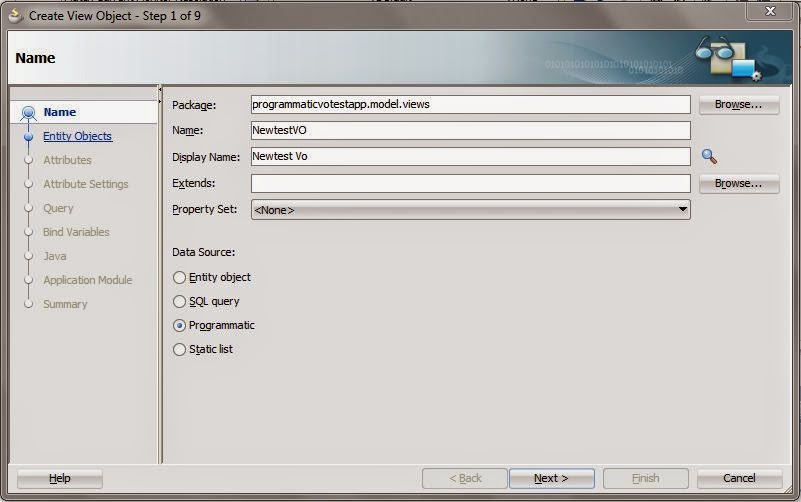
Now create an ADF Application and create a programmatic viewobject


Then press next and define attributes for the viewObject


Generate the following java classes


Click Finish.


Now we have made the viewObject. We will have to override the lifeCycle methods. Here is the code that I have used for this viewObject.


package programmaticvotestapp.model.views;

import java.sql.ResultSet;

import java.util.ArrayList;

import oracle.jbo.Row;
import oracle.jbo.server.ViewObjectImpl;
import oracle.jbo.server.ViewRowImpl;
import oracle.jbo.server.ViewRowSetImpl;

import programmaticvotestapp.model.EmpDC;
// ---------------------------------------------------------------------
// ---    File generated by Oracle ADF Business Components Design Time.
// ---    Wed Apr 09 14:28:40 IST 2014
// ---    Custom code may be added to this class.
// ---    Warning: Do not modify method signatures of generated methods.
// ---------------------------------------------------------------------
public class ProgrammaticVOImpl extends ViewObjectImpl {
    private ArrayList<EmpDC> empList = new ArrayList<EmpDC>(); 
    /**
     * This is the default constructor (do not remove).
     */
    public ProgrammaticVOImpl() {
    }

    /**
     * executeQueryForCollection - overridden for custom java data source support.
     * This method is executed at first.
     * So in this method we need to load our data source . 
     * In simple words initialize the list
     */
    protected void executeQueryForCollection(Object qc, Object[] params, int noUserParams) {
        // Populate the list for the firstTime
        populateArrayList();
        //To set the initial position for fetch to start
        setFetchPosition(qc,0);
        super.executeQueryForCollection(qc, params, noUserParams);
    }

    /**
     * hasNextForCollection - overridden for custom java data source support.
     * This method is called after executeQueryForCollection to check if any row exist in the datasource or not.
     * When returned true, createRowFromResultSet is called and a new row from the rowset is created.
     */
    protected boolean hasNextForCollection(Object qc) {
        return getFetchPosition(qc) < empList.size();
    }

    /**
     * createRowFromResultSet - overridden for custom java data source support.
     * creates a newRow and adds it to viewObject
     */
    protected ViewRowImpl createRowFromResultSet(Object qc, ResultSet resultSet) {
        int fetchPosition = getFetchPosition(qc);
        System.out.println("Fetch Position is : "+fetchPosition);
        ViewRowImpl newRow = (ViewRowImpl)createNewRowForCollection(qc);
        EmpDC c = empList.get(fetchPosition);
        // Setting value in the new row which is created.
        newRow.setAttribute("EmpId", c.getEmpId());
        newRow.setAttribute("EmpName", c.getEmpName());
        newRow.setAttribute("Salary", c.getSalary());
        // Updating the fetch Position
        setFetchPosition(qc, fetchPosition+1);
        
        return newRow;
    }

    /**
     * getQueryHitCount - overridden for custom java data source support.
     */
    public long getQueryHitCount(ViewRowSetImpl viewRowSet) {
        long value = empList.size();
        return value;
    }
    /**
         * Method to set the new fetch position
         * @param rowset
         * @param position
         * To set the position on the nextRecord to fetch i.e. next record of arrayList
         */
        private void setFetchPosition(Object rowset, int position) {
            if (position == empList.size()-1) {
                setFetchCompleteForCollection(rowset, true);
            }
            setUserDataForCollection(rowset, new Integer(position));
        
    }
    /**
         * Method to get the current fetch position
         * @param rowset
         * @return
         * 
         * This method gets the fetchPosition to fetch the row from the arrayList to retrieve the data
         */
        private int getFetchPosition(Object rowset) {
            int value = ((Integer)getUserDataForCollection(rowset)).intValue();
            return value;
        }
    
    public void populateArrayList(){
        empList.clear();
        empList.add(new EmpDC(1,1100,new StringBuffer("First Employee")));
        empList.add(new EmpDC(2,2100,new StringBuffer("Second Employee")));
        empList.add(new EmpDC(3,1300,new StringBuffer("Third Employee")));
        empList.add(new EmpDC(4,1700,new StringBuffer("Fourth Employee")));
        empList.add(new EmpDC(5,1200,new StringBuffer("Fifth Employee")));
        empList.add(new EmpDC(6,5100,new StringBuffer("Sixth Employee")));
        empList.add(new EmpDC(7,1900,new StringBuffer("Seventh Employee")));
        empList.add(new EmpDC(8,1200,new StringBuffer("Eight Employee")));
        empList.add(new EmpDC(9,1200,new StringBuffer("Ninth Employee")));
        empList.add(new EmpDC(10,1100,new StringBuffer("Tenth Employee")));
    }
}

on running the application you can see


You can download the sample application here ProgrammaticVoApp

Likewise you can use other datasources to populate the programmatic viewObject. The above model shows a very simple implementation, use cases can be much complex.


References :
1 .http://huysmansitt.blogspot.in/2012/08/adf-programmatical-views-made-simple.html?showComment=1397033254692#c2288712975950397947
2 .http://adfjavacodes.blogspot.in/2013/12/how-viewobjects-get-executed.html


Friday, 4 April 2014

ADF : af:table or adf form or adf page taking too much time to load

During the development sometimes we come across this problem. In our case we had a table on a page and it was taking too much time to load, even though there were only one row in the database table but then also it was taking more than enough time to load. After the analysing the problem finally we were able to solved the problem.

The main problem was with the List of Values with SingleSelection which was inserted in the table. In a column we had to show the name in place of the id, so the developer created a List of Values in the viewObject and put it in the table on page. At first it was working fine but later as the number of rows grown in the List of values the list started taking time to load.

The main cause was the number of rows in the list of values. Single selection list of values matches the id with the value and shows values, so inorder to map it needs all the rows, so whenever the table was being load the ListOfValues started to fetch all the rows, and as the number of rows was too much so abviously it was taking too much time. So, we had to replace the list of values but we also had to show the name in place of id. 

So there are many ways to do that : 

1. We can include the name that we have to display in the query of the table itself, because of which we can simply display it in a column.

2. Otherwise we have to use a viewobject with query that returns a less number of rows and better if it returns one row with the id and DisplayName. 
Suppose we have to show Department Name in place of department id in Employees Table. The query will be something like this : SELECT DEPARTMENT_NAME FROM DEPARTMENTS WHERE DEPARTMENT_ID = :DeptIdBind

And then we need to show the display name so we created a transient attribute.
Then in the getter of the transient attribute, get the viewObject and pass the bindVariables and execute the query. The query will return a row and then we can fetch the name from the view object and show it by returning it.

There is a disadvantage of using this method, as the query is executed for all the rows fetched in the table. But page load problem will be solved. 

This may depend on the use case.  For us both worked well.

I will suggest never to use SingleSelection List of Values that contains large number of rows in the page. Not even on the adf form. Because due to that it will take too much time to load.

Thanks for reading. If you have any question, Please feel free to ask.

Thursday, 3 April 2014

ADF : Alternate of Current Row Selection In af:table | Using f:attribute in ADF

Today am about to show how we can get the value of the selected row from a table without using the RowSelection property of the table.

This came to my mind when I was working on an editable table on a PopUp. And the scenario was that when the user clicks on a link or button in the table then an another table on a new popup need to be shown. The other thing was that both the tables contains large number of rows.

The problem was when we were selecting the current row in table the Framework was trying to make the selected row as current, because of which it was refreshing the table.So every time I select a row the whole table was being refreshed to set selected row as current.

So I tried out some other way to to the same.

Here is the sample Application .

I have created a Application with HR Schema with Employee and Department tables. On the page I have dropped two popUps, First for department table and second for employee table.

Drag the Department table on the popup and set rowSelection to none.

Put a Command button the department table. And add an f:attribute in the commandButton and give it a name and value as department id.


Here I have used Department Id as it is the key to department table like wise you can use user primary key as key. And then you can find the row from the key.

Then on other popup drag the employee table.
In the employees table create a viewCriteria on DepartmentId.
On click on OpenEmployee button, I have used a method to get the attibute.


    public void openEmpACTION(ActionEvent actionEvent) {
        RichCommandButton ob = (RichCommandButton)actionEvent.getSource();
        Integer dept = (Integer)ob.getAttributes().get("DeptId");
        System.out.println("Dept id is : "+dept);
        OperationBinding binding = getBindings().getOperationBinding("setDeptIdInEmployee");
        binding.getParamsMap().put("deptId", dept);
        binding.execute();
        showPopup(popEmp, true);
        //   setDeptIdInEmployee
    }
    /**Method to get Binding Container*/
    public BindingContainer getBindings() {
        return BindingContext.getCurrent().getCurrentBindingsEntry();
    }

I have created a method setDeptIdInEmployee  in AMImpl and added it to client and used in the bean. Here is the code of AMImpl.


    public void setDeptIdInEmployee(Integer deptId){
        ViewObjectImpl employeesView1 = this.getEmployeesView1();
        employeesView1.setNamedWhereClauseParam("DepartmentBind", deptId);
        employeesView1.executeQuery();
    }

On running the application the following page opens

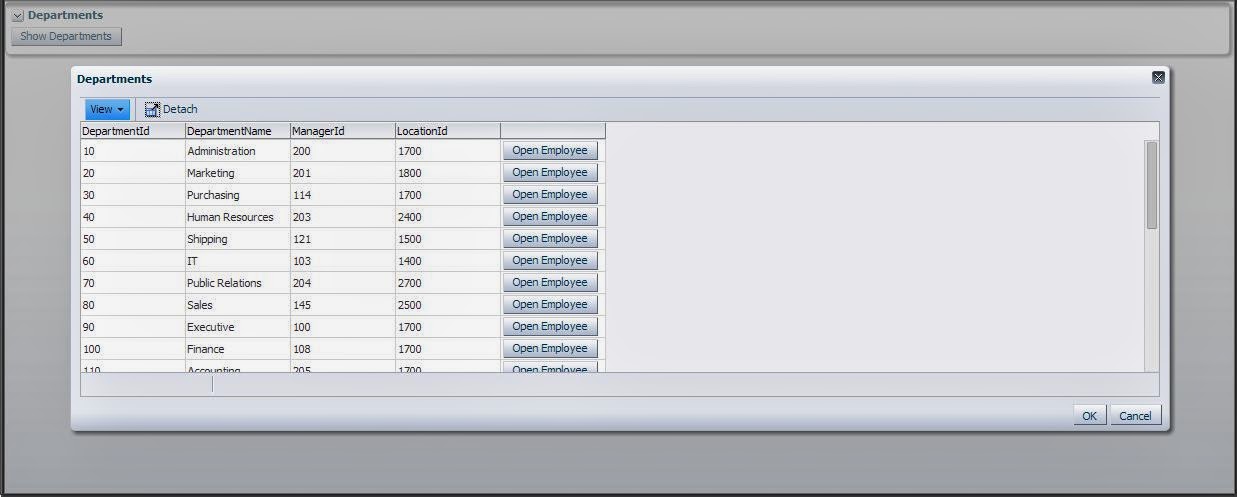
Then Click on the Show Departments button


Now click on the button open Employee and the next popUp will show Employee of Selected Department. here when clicked on Sales row
I am attaching a sample application . You can download it here  :TableOnPopupApp
Like wise you can use this to perform other operations too as now we have the select row.

Bindings in ADF

Binding provides objects to link components, it is the most innovative part of ADF after Task Flows and provides direct interaction with Appication Module. We can work with bindings in ManagedBean and also in Expression Builder. Bindings are basically used for the interaction on the model and the viewController in an ADF Application.

When we drag any DataControl on page then a binding entry is made in the pageDef of the page for that particular field. Suppose we want to Use CreateInsert operation on a button clik in the page, then we have to create the binding of CreateInsert action in the pageDef on that page and then we can use this action in our ManagedBean to perform the desired operation.

Oracle ADF provides following types of bindings:

  1. Action Binding

    Action Binding is specifically defined for a button component. Provides access to operations defined by the business object. Such as CreateInsert , Delete.
    //The code below gets the Bindings entry of the binding container and fetches the current bindings entry
     BindingContainer bindings = BindingContext.getCurrent().getCurrentBindingsEntry();
     //Gets the opertaion bindings for the method "CreateInsert"
     OperationBinding operationBinding = bindings.getOperationBinding("CreateInsert");
     //Then execute executes the method of the binding
     operationBinding.execute(); 
     
    Likewise you can use the above code to call bindings in ManagedBean.
  2. Iterator Binding
  3. When we drag tables on the page in ADF then ADF creates a IteratorBinding in the pageDef of the page. The iterator binding can be used to get the iterator of the table in the ManagedBean.
  4. Given below is the code that can be used to get the IteratorBinding in the ManagedBean.
        BindingContext btx = BindingContext.getCurrent();
        DCBindingContainer dcbct = (DCBindingContainer)btx.getCurrentBindingsEntry();
        DCIteratorBinding binding = dcbct.findIteratorBinding("StudentIterator");
        Row currentRow = binding.getCurrentRow();
  5. Here in the last line I have get the current Row from th iterator. 
    LikeWise you can use it to perform desired action. 
  6. 
    
  7. ValueBindings
    Value Bindings are created in the pageDef for all the attributes that are added on the page from the dataControl.