Showing posts with label viewController. Show all posts

Sunday, 18 March 2018

ADF | Things not to do in a Component Validator in ADF

Hi,

This a very newbie post that will help new ADF Developers.

In ADF we use component validator to validate any value that Is being posted in the binding layer. This is a very effective way to avoid any garbage post in the Application.

During the development we face many challenges and to meet those challenges we do different types of things.  Sometimes we write codes at inappropriate places which in turn puts an adverse effect on the Applications performance. 

So here are few of the things that should not be done in a Validator of a Component in ADF.

  1. Never use the validator to validate the Mandatory field. This is because the validator doesn’t get fired in case of a null value in the component. So sometimes people are expecting a validation in case of null value and it doesn't get fired.
  2. Never use database function to do CRUD operation or any kind of CRUD Operation in the Application in a Validator because the Validator runs every time the data is being posted in the binding layer and the update will run many times which will have a negative impact on the database and Application performance.
  3. Never use processUpdates  inside a Validator ProcessUpdate updates the value of the component in the binding layer which will actually defeat the purpose of the validator.

Thanks.

Monday, 2 September 2013

Following the MVC Architecture in ADF, AMImpl method Called in Managed Bean

Hello everyone,

Here am about to explain how we can optimize our application for performance in ADF. ADF follows MVC architecture for application development.So there are times when we need an instance of model impl classes in the bean such as for example: we need AppModuleImpl in our bean class to get or fetch value from a view object. So for that we have to create an AppModuleImpl instance in the bean and then get viewObject from that.

So, if we get the AppModuleImpl object in bean then the purpose of MVC is being violated.I mean then we would be merging the model and viewController separation. And further more new instances of AppModuleImpl and etc, will created in our Managed Bean, this adds to violation of MVC Architecture . So it is better to keep the database logic in the database layer i.e. model and keep the controller logic in in viewController.

So the problem is that if we have to interact with the model layer from the bean, then how shall we do it?

The answer to this question is the use of ADF bindings.
Binding is used to interact with model layer from the viewController layer.

Suppose in a scenario, just for example we have to get the location of the employee by using EmployeeId. This needs interaction with the model layer.

So to do that we have to create a method that will take EmployeeId as input and give back location in return. 

  1. Go to the AppModuleImpl and create a method.

    **Please do not use "Object" type in return parameter or in inputParameter,if you do this then the method will not be shown in ClientInterface**
        public Integer getLoc(Integer EmpId){
            Integer sal = null;
            Row[] row_2 = this.getEmployee1().getFilteredRows("EmployeeId", EmpId);
            if(row_2.length>0){
                sal = Integer.parseInt(row_2[0].getAttribute("Salary").toString());
            }
            return sal;
        }


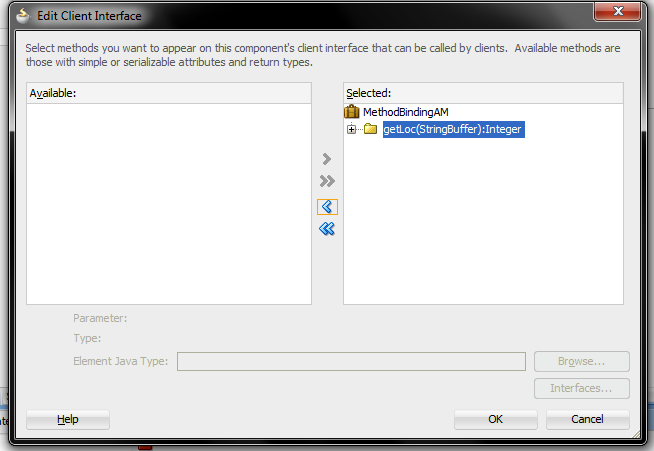
  2. Then go to clientInterface of the AM and add the method to clientInterface.


  3. Then you have to create binding for this method on the page.


  4. Now we have to call this binding and put the parameters in it from the bean.
        public void fetchSalary(ActionEvent actionEvent) {
            OperationBinding binding = getBindings().getOperationBinding("getLoc");
            // to put parameters value in the method
            binding.getParamsMap().put("EmpId", empId);
            Object execute = binding.execute();
            salary  = (Integer) execute;
        }


  5. Now when you run the application.


    and when Fetch Salary button is clicked

  6. You can download the sample application here : MethodBindingApp.rar.
  7. If you have any query regarding this, please write in the comments.