Showing posts with label ArrayList. Show all posts

Monday, 28 December 2015

ADF | Fetching Multiple selected Rows from a Table populated from POJO in ADF

Hi,

This is again an Extension to my previous post on how we can perform edit on a table populated from POJO. http://adfjavacodes.blogspot.com/2015/12/adf-performing-edit-in-table-from-pojo.html

Everything is same from my previous post.
There are certain changes in the application. They are :

Here I have enabled Multiple row selection for the table from the property inspectior to
 <af:table var="row" rowBandingInterval="0" id="t1" value="#{viewScope.BookBean.bookInfo}"
                                  rowSelection="multiple" binding="#{viewScope.BookBean.tableBinding}">

I have also created a binding of the table for getting the  Multiple selected rows from the table.
Here is the code of the of the Bean where I have created a method that will fetch the selected rows from the table.


package edittableonpojo.view.bean;

import edittableonpojo.view.dc.BookInfo;

import java.util.ArrayList;

import java.util.Iterator;

import javax.faces.event.ActionEvent;
import javax.faces.event.ValueChangeEvent;

import oracle.adf.view.rich.component.rich.data.RichTable;

import org.apache.myfaces.trinidad.model.RowKeySet;

public class BookBean {
    private ArrayList<BookInfo> bookDtls = new ArrayList<BookInfo>();
    private RichTable tableBinding;

    public BookBean() {
        bookDtls.add(new BookInfo("1A", "The Alchemist", "Paulo Cohelo"));
        bookDtls.add(new BookInfo("2A", "Game Of Thrones", "George R. R. Martin"));
        bookDtls.add(new BookInfo("3A", "Five Point Someone", "Chetan Bhagat"));
        bookDtls.add(new BookInfo("4A", "Harry Potter", "J.K.Rowling"));
        bookDtls.add(new BookInfo("5A", "Wings of Fire", "A.P.J Abdul Kalam"));
    }

    public ArrayList<BookInfo> getBookInfo() {
        return bookDtls;
    }
    
    public void printValues(ActionEvent ace){
        for(BookInfo row : bookDtls){
            System.out.println("Row : "+row.toString());
        }
    }

    public void fetchSelectedValuesAL(ActionEvent actionEvent) {
        ArrayList<BookInfo> selectedRows = new ArrayList<BookInfo>();
        RowKeySet keySet = getTableBinding().getSelectedRowKeys();
        Iterator<Object> itr = keySet.iterator();
        while(itr.hasNext()){
            // next gives the index of the selected row
            Object next = itr.next();
            // here we have fetched the row on index from the bookDtls list
            selectedRows.add(bookDtls.get((Integer)next));
        }
        System.out.println("Selected Rows are : "+selectedRows.toString());
    }

    public void setTableBinding(RichTable tableBinding) {
        this.tableBinding = tableBinding;
    }

    public RichTable getTableBinding() {
        return tableBinding;
    }
}

On running the application ,  I have selected Two rows from the table.

On clicking "Get Selected Values" button.


Here is the Sample Application : EditableTableOnPOJO.rar

Performing Edit in a table from POJO in Oracle ADF

Hi,

This post is about Editing the values of the Table. You can learn how to populate table from the arrayList from my previous blog.http://adfjavacodes.blogspot.com/2013/04/adf-populating-adf-table-from-bean.html


Every step is same as in my previous post.
There only one thing needs to be changed. Suppose here we have to edit the BookDesc from the front End.
For doing this, We just need to provide the editable property in an inputText and that’s it. The editing in automatically handled.

We have to edit the Book Description Column, So I have just replaced the output text component with an input text. Here is the code for the same.

Here is the code of the jspx page. I have also added a button to print the updated Values of the List.

On running the page .

Now I have changed the Description of one Book to 
On clicking Show Current Values in the List  values are being printed in the console like


SO as we can see the row have been updated.

Here is the Sample Application : EditableTableOnPOJO.rar

Wednesday, 9 April 2014

ADF : Programmatic ViewObjects in ADF, Populating programmatic viewObject with an ArrayList

Hello all,

Today I am going to demonstrate about how to make programmatic viewObject in ADF.
There are basically 4 types of viewObjects.

1. ViewObjects based on Entity.
2. ViewObjects based on SqlQuery (also called Readonly viewObject)
3. Static viewObjects (contains fix now of rows)
4. Programmatic viewObjects (Programmatic viewObjects are viewObjects that are not populated from an sql query).

For understanding  the working of programmatic viewObjects, you must first understand the lifecycle of a viewObject. You need to know what methods are called when a viewObject is executed. Here is the sequence of methods that are called when a viewObject is executed.

LIFECYCLE

When a viewObject is called the following methods are executed in the given sequence. 
  • At first when the viewObject is first executed the method first called in the ViewObjectImpl is
    executeQueryForCollection(Object qc, Object[] params, int noUserParams)
    This method executes the Database Query in the viewObject and then calls the next method.

  • After executeQueryForCollection is executed then method hasNextForCollection(Object qc) is called. This method checks if the collection returned have a row or not. If hasNextForCollection(Object qc) returns True then the next method of the lifeCycle is called which converts the row to ADF understandable form i.e. into ViewObjectRowImpl from.

  • So when method hasNextForCollection retuns true then method createRowFromResultSet(Object qc, ResultSet resultSet) is called and this method converts the row into ADF understandable form.

  • This goes on until all the rows are covered and there is no rows left in collection. When there are no rows in the collection then the method hasNextForCollection returns false .

  • Then method setFetchCompleteForCollection(java.lang.Object qc,boolean val) is called and it sets the flag for fetch completion. This indicates that the rows from the collection are fetched.
- See more at: http://adfjavacodes.blogspot.in/2013/12/how-viewobjects-get-executed.html#sthash.whg7AwM9.dpuf

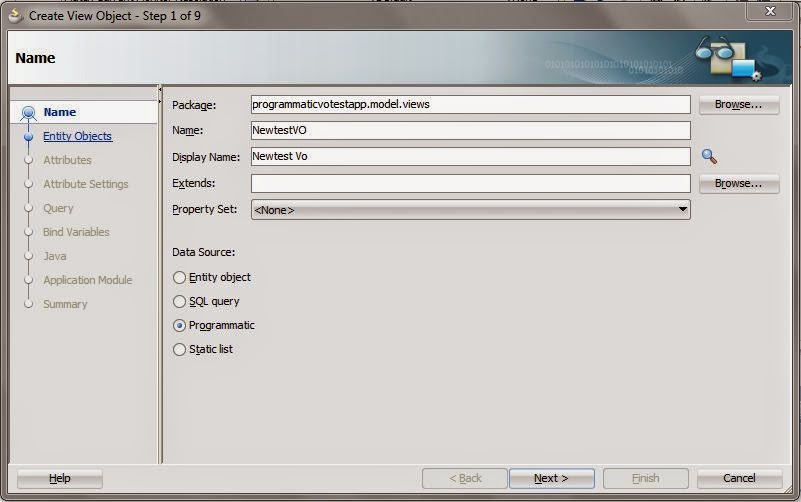
Now create an ADF Application and create a programmatic viewobject


Then press next and define attributes for the viewObject


Generate the following java classes


Click Finish.


Now we have made the viewObject. We will have to override the lifeCycle methods. Here is the code that I have used for this viewObject.


package programmaticvotestapp.model.views;

import java.sql.ResultSet;

import java.util.ArrayList;

import oracle.jbo.Row;
import oracle.jbo.server.ViewObjectImpl;
import oracle.jbo.server.ViewRowImpl;
import oracle.jbo.server.ViewRowSetImpl;

import programmaticvotestapp.model.EmpDC;
// ---------------------------------------------------------------------
// ---    File generated by Oracle ADF Business Components Design Time.
// ---    Wed Apr 09 14:28:40 IST 2014
// ---    Custom code may be added to this class.
// ---    Warning: Do not modify method signatures of generated methods.
// ---------------------------------------------------------------------
public class ProgrammaticVOImpl extends ViewObjectImpl {
    private ArrayList<EmpDC> empList = new ArrayList<EmpDC>(); 
    /**
     * This is the default constructor (do not remove).
     */
    public ProgrammaticVOImpl() {
    }

    /**
     * executeQueryForCollection - overridden for custom java data source support.
     * This method is executed at first.
     * So in this method we need to load our data source . 
     * In simple words initialize the list
     */
    protected void executeQueryForCollection(Object qc, Object[] params, int noUserParams) {
        // Populate the list for the firstTime
        populateArrayList();
        //To set the initial position for fetch to start
        setFetchPosition(qc,0);
        super.executeQueryForCollection(qc, params, noUserParams);
    }

    /**
     * hasNextForCollection - overridden for custom java data source support.
     * This method is called after executeQueryForCollection to check if any row exist in the datasource or not.
     * When returned true, createRowFromResultSet is called and a new row from the rowset is created.
     */
    protected boolean hasNextForCollection(Object qc) {
        return getFetchPosition(qc) < empList.size();
    }

    /**
     * createRowFromResultSet - overridden for custom java data source support.
     * creates a newRow and adds it to viewObject
     */
    protected ViewRowImpl createRowFromResultSet(Object qc, ResultSet resultSet) {
        int fetchPosition = getFetchPosition(qc);
        System.out.println("Fetch Position is : "+fetchPosition);
        ViewRowImpl newRow = (ViewRowImpl)createNewRowForCollection(qc);
        EmpDC c = empList.get(fetchPosition);
        // Setting value in the new row which is created.
        newRow.setAttribute("EmpId", c.getEmpId());
        newRow.setAttribute("EmpName", c.getEmpName());
        newRow.setAttribute("Salary", c.getSalary());
        // Updating the fetch Position
        setFetchPosition(qc, fetchPosition+1);
        
        return newRow;
    }

    /**
     * getQueryHitCount - overridden for custom java data source support.
     */
    public long getQueryHitCount(ViewRowSetImpl viewRowSet) {
        long value = empList.size();
        return value;
    }
    /**
         * Method to set the new fetch position
         * @param rowset
         * @param position
         * To set the position on the nextRecord to fetch i.e. next record of arrayList
         */
        private void setFetchPosition(Object rowset, int position) {
            if (position == empList.size()-1) {
                setFetchCompleteForCollection(rowset, true);
            }
            setUserDataForCollection(rowset, new Integer(position));
        
    }
    /**
         * Method to get the current fetch position
         * @param rowset
         * @return
         * 
         * This method gets the fetchPosition to fetch the row from the arrayList to retrieve the data
         */
        private int getFetchPosition(Object rowset) {
            int value = ((Integer)getUserDataForCollection(rowset)).intValue();
            return value;
        }
    
    public void populateArrayList(){
        empList.clear();
        empList.add(new EmpDC(1,1100,new StringBuffer("First Employee")));
        empList.add(new EmpDC(2,2100,new StringBuffer("Second Employee")));
        empList.add(new EmpDC(3,1300,new StringBuffer("Third Employee")));
        empList.add(new EmpDC(4,1700,new StringBuffer("Fourth Employee")));
        empList.add(new EmpDC(5,1200,new StringBuffer("Fifth Employee")));
        empList.add(new EmpDC(6,5100,new StringBuffer("Sixth Employee")));
        empList.add(new EmpDC(7,1900,new StringBuffer("Seventh Employee")));
        empList.add(new EmpDC(8,1200,new StringBuffer("Eight Employee")));
        empList.add(new EmpDC(9,1200,new StringBuffer("Ninth Employee")));
        empList.add(new EmpDC(10,1100,new StringBuffer("Tenth Employee")));
    }
}

on running the application you can see


You can download the sample application here ProgrammaticVoApp

Likewise you can use other datasources to populate the programmatic viewObject. The above model shows a very simple implementation, use cases can be much complex.


References :
1 .http://huysmansitt.blogspot.in/2012/08/adf-programmatical-views-made-simple.html?showComment=1397033254692#c2288712975950397947
2 .http://adfjavacodes.blogspot.in/2013/12/how-viewobjects-get-executed.html