Showing posts with label ADF. Show all posts

Wednesday, 19 August 2020

ADF application gives error while running it on the Production Server

Problem: Oracle ADF application is running fine when I am running it on my local system, but when i deploy the application on the Production Server then the application crashes.

Error log:

<Error> <org.apache.myfaces.trinidad.webapp.UIXComponentELTag> <BEA-000000> <Error when processing tag for component with id: "ot7". The scoped id of the parent component is ":r1:pc1:t1:c1".
javax.faces.FacesException: javax.el.PropertyNotFoundException: Target Unreachable, 'null' returned null
    at com.sun.faces.application.ApplicationImpl.createComponentApplyAnnotations(ApplicationImpl.java:1952)
    at com.sun.faces.application.ApplicationImpl.createComponent(ApplicationImpl.java:447)
    at javax.faces.webapp.UIComponentELTag.createComponent(UIComponentELTag.java:222)
    at org.apache.myfaces.trinidad.webapp.UIXComponentELTag.createComponent(UIXComponentELTag.java:225)
    at javax.faces.webapp.UIComponentClassicTagBase.createChild(UIComponentClassicTagBase.java:506)
    at javax.faces.webapp.UIComponentClassicTagBase.findComponent(UIComponentClassicTagBase.java:744)
    at javax.faces.webapp.UIComponentClassicTagBase.doStartTag(UIComponentClassicTagBase.java:1311)
    at org.apache.myfaces.trinidad.webapp.UIXComponentELTag.doStartTag(UIXComponentELTag.java:115)
    at oracle.adfinternal.view.faces.unified.taglib.output.UnifiedOutputTextTag.doStartTag(UnifiedOutputTextTag.java:55)
    at oracle.jsp.runtime.tree.OracleJspBodyTagNode.executeHandler(OracleJspBodyTagNode.java:50)
    at oracle.jsp.runtime.tree.OracleJspCustomTagNode.execute(OracleJspCustomTagNode.java:263)
    at oracle.jsp.runtime.tree.OracleJspClassicTagNode.evalBody(OracleJspClassicTagNode.java:87)
    at oracle.jsp.runtime.tree.OracleJspBodyTagNode.executeHandler(OracleJspBodyTagNode.java:58)
    at oracle.jsp.runtime.tree.OracleJspCustomTagNode.execute(OracleJspCustomTagNode.java:263)
    at oracle.jsp.runtime.tree.OracleJspClassicTagNode.evalBody(OracleJspClassicTagNode.java:87)
    at oracle.jsp.runtime.tree.OracleJspBodyTagNode.executeHandler(OracleJspBodyTagNode.java:58)
    at oracle.jsp.runtime.tree.OracleJspCustomTagNode.execute(OracleJspCustomTagNode.java:263)

Possible solutions: There can be two possible reasons of this error. 

1. PPR (Partial Page Rendering) 

PPR stands for Partial Page Rendering and it as used in oracle ADF to refresh some particular part of the page if some data changes on the page or on trigger event. This helps in optimizing the performance of the application as for data refresh the whole page is not loaded, instead some part of the page which is required to be refreshed is loaded. But there are some bugs in ADF due to which this behaves in strange way. If this is the cause then you can resolve this issue by disabling PPR in the Page or in the Application. 

Caution: This may lead to another issues related to component refresh on the page as this disables the automatic refresh, you may have to write some code to refresh the page at certain point. While doing this it is must to check if all the functionality of the application is working as it is supposed to be or not. 

How to disable PPR?? 

PPR can be disabled from two levels.

  1. Application Level: By diabling PPR at Application level this is default properties of all the pages. This can be done in the adf-config file.


  2. Page Level: This can be done to the iterators of the in the pagedef of the page.


2. PageDef Filename conflict

If we are running an application is production environment and if two application has pageDef, page name, taskflow name, package name same then this error comes up. This majorly comes up due to same pageDef name.

So when you run you application then the clash doesn't happen, but when your is running it with all other applications then this conflict happens and the framework is confused which file to consider for the page. In that case this issue comes up.

Solution:

Rename the pageDef or page for which this issue is coming by clicking on the refactor in the JDeveloper.

How to avoid this??

Make sure that all the applications are having a different package name. This will avoid this condition.

I will try to update this post with actual error log which comes up in case of PageDef conflict..

Sunday, 5 January 2020

CRUD operation on a Webpage in ADF Application

This is a followup post on how we can create an ADF Page based on the business components created in my last post. https://adfjavacodes.blogspot.com/2019/12/creating-first-oracle-adf-application.html

1. Create a page by using clicking on the new Page in the ViewController project.

Creating new JSPX Page

2. Enter the page name and select the Document type. The document type can be of two types
 a. Facelets (JSF Pages)
 b. JSP XML (JSP Pages).

Here we are using JSPX.

Adding page name in oracle ADF

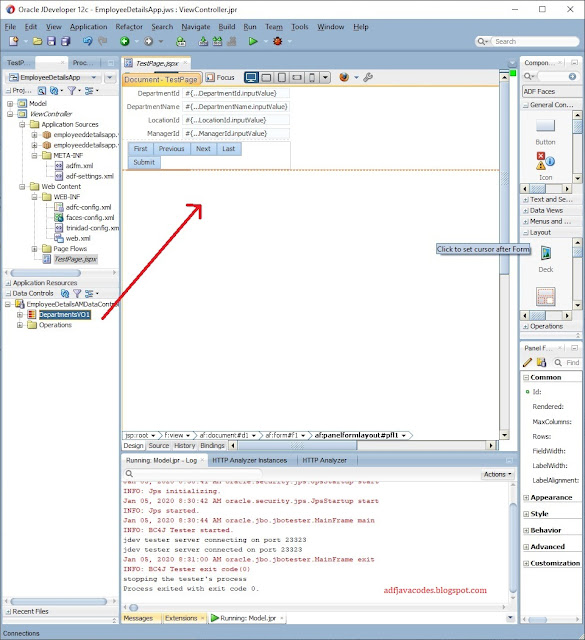
3. From the data control Drag and drop the view object instance on the page.
4. Selecting Row navigation to create First, Next, Previous, Last buttons automatically.

5. Now as you can see the form is created with navigation buttons.


6. From the Data control Drag and drop Commit and Rollback buttons to Commit and rollback the transactions. 


 7. After that drag and drop the data control on the page in form of a table.


8. Select the highlighted options.
a. Enable Sorting (To enable inbuilt sorting in the table)
b. Enable Filtering (To enable inbuilt sorting in the table)
c. Read-only Table (To create a read-only table where editing in table cannot be done) 


9. Drag and drop the delete button from Data Control to delete the record.


10. Now run the Application.


11. The Application will open up in a browser. The Page contains two parts. Form view where the user will do the DML Operation and Table view to view the total records.


12. To create a record click on the createInsert button. It will create a blank record and insert into the view object.


13. A blank record will be created.


14. Fill the relevant values and commit the data.


15. The record is saved and can be viewed in the table.


16. Now we have to edit a record, here we select the Department IT for editing. After edit, we click on Submit Button to submit the record and click on commit to save the record.


16. Now we have to check deletion. So select the record and click on the delete button and then click on the commit button to save the record.


If you have any confusion please let me know :)

Monday, 2 December 2019

What is a View Object in Oracle ADF??

View Object is used to view and update data in ADF Applications.

We need a database query to perform CRUD operation in the database, that query is represented by ViewObject in oracle ADF Application.

Analogy: In database if what has to perform CRUD operation, then what would you do? You will write a Query. Right?? That query is represented by ViewObject in ADF.

It basically contains database query to fetch or update the records.

View Object are basically of 4 types.

1. Entity based ViewObject

Entity based ViewObject is based on EntityObject of ADF application and can be used to create, read, update and delete or in short perform CRUD operation a database.

how to create an Entity based ViewObject??

2.  Query based ViewObject.

Query-based ViewObject is based on Query and can be used to view the record. 

3.  Static ViewObject.

Static ViewObject is based on the static Values defined in the ViewObject. This can be used to show static content.

4. Programmatic ViewObject.

Programmatic ViewObject is used where data is populated in the ViewObject programmatically. This data is populated by using the POJO class or some database Cursor or Procedure.

how to create a Programmatic ViewObject??


Sunday, 21 April 2019

ADF | Line 1 column 18. When does this error comes up.


Error Description: Line 1 column 18

Cause: This error comes up when we call a database function from the ADF Application and that database function is uncompiled. The function may be uncompiled due to some error in the database function.

Corrective Action: You just have to open the database function and fix the error in the database function. Once the function is compiled this error will not appear again.

Sunday, 18 March 2018

ADF | Things not to do in a Component Validator in ADF

Hi,

This a very newbie post that will help new ADF Developers.

In ADF we use component validator to validate any value that Is being posted in the binding layer. This is a very effective way to avoid any garbage post in the Application.

During the development we face many challenges and to meet those challenges we do different types of things.  Sometimes we write codes at inappropriate places which in turn puts an adverse effect on the Applications performance. 

So here are few of the things that should not be done in a Validator of a Component in ADF.

  1. Never use the validator to validate the Mandatory field. This is because the validator doesn’t get fired in case of a null value in the component. So sometimes people are expecting a validation in case of null value and it doesn't get fired.
  2. Never use database function to do CRUD operation or any kind of CRUD Operation in the Application in a Validator because the Validator runs every time the data is being posted in the binding layer and the update will run many times which will have a negative impact on the database and Application performance.
  3. Never use processUpdates  inside a Validator ProcessUpdate updates the value of the component in the binding layer which will actually defeat the purpose of the validator.

Thanks.

Friday, 16 March 2018

Automatic Refresh table data in Oracle ADF


Hi,

Today I am going to post about how we can automatically refresh a table on particular time interval. For this we will be using af:poll component.

Let us start by simply creating a sample application with hr Schema.

And then drop a viewObject as a table on a page.

Here is the page.


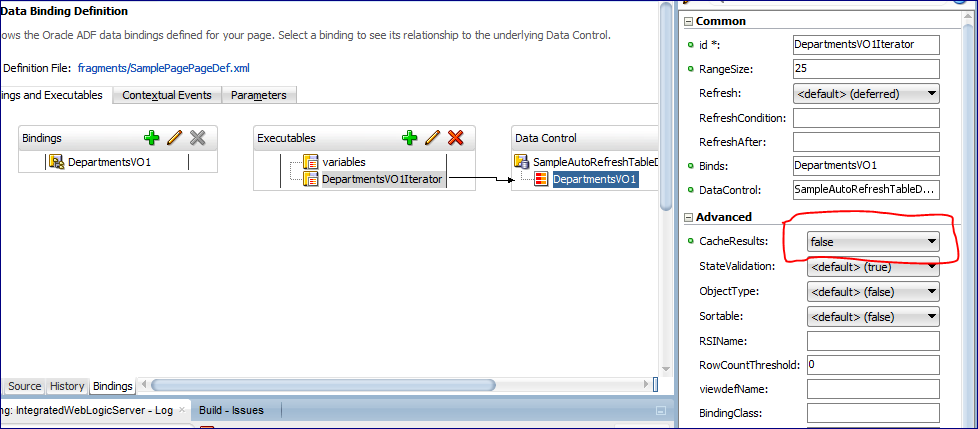
Correction : To refresh the table on every refresh we will have to disable the cache from the Table Iterator.[This step can pe skipped].


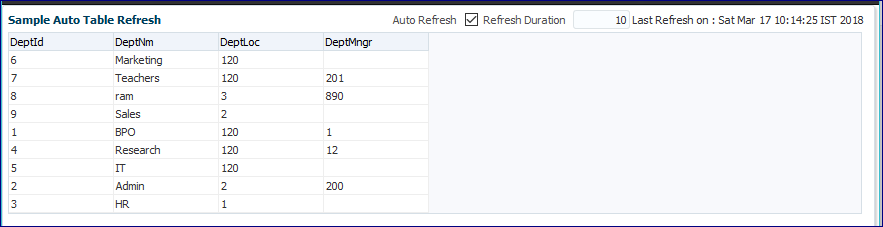
After that when we run the application.


 After that, we change the data in the database.


Then when a poll is called then the department name Admin changed to Admin New


Here is the code of the Page used in this project.


<af:panelBox text="Sample Auto Table Refresh" id="pb1" showDisclosure="false">
    <f:facet name="toolbar">
      <af:toolbar id="t2">
        <af:selectBooleanCheckbox label="Auto Refresh" id="sbc1"
                                  value="#{viewScope.smplPageRefreshBean.autoRefreshEnabled}"
                                  autoSubmit="true"/>
        <af:inputText label="Refresh Duration" id="it1" contentStyle="width:50px;"
                      value="#{viewScope.smplPageRefreshBean.refreshDuration}" autoSubmit="true"
                      partialTriggers="sbc1" visible="#{viewScope.smplPageRefreshBean.pollOn}"/>
        <af:outputText value="Last Refresh on : #{viewScope.smplPageRefreshBean.lastRefreshedOn}" id="ot5"
                       partialTriggers="sbc1 p1" visible="#{viewScope.smplPageRefreshBean.pollOn}"/>
      </af:toolbar>
    </f:facet>
    <af:panelGroupLayout id="pgl1" layout="vertical">
      <af:poll id="p1" interval="#{viewScope.smplPageRefreshBean.pollDuration}" partialTriggers="sbc1"
               pollListener="#{viewScope.smplPageRefreshBean.pollListner}"/>
      <af:table value="#{bindings.DepartmentsVO1.collectionModel}" var="row" rows="#{bindings.DepartmentsVO1.rangeSize}"
                emptyText="#{bindings.DepartmentsVO1.viewable ? 'No data to display.' : 'Access Denied.'}"
                rowBandingInterval="0" selectedRowKeys="#{bindings.DepartmentsVO1.collectionModel.selectedRow}"
                selectionListener="#{bindings.DepartmentsVO1.collectionModel.makeCurrent}" rowSelection="single"
                fetchSize="#{bindings.DepartmentsVO1.rangeSize}" id="t1" partialTriggers="::sbc1 ::p1" autoHeightRows="10"
                styleClass="AFStretchWidth">
        <af:column headerText="#{bindings.DepartmentsVO1.hints.DeptId.label}" id="c1">
          <af:outputText value="#{row.DeptId}" shortDesc="#{bindings.DepartmentsVO1.hints.DeptId.tooltip}" id="ot1">
            <af:convertNumber groupingUsed="false" pattern="#{bindings.DepartmentsVO1.hints.DeptId.format}"/>
          </af:outputText>
        </af:column>
        <af:column headerText="#{bindings.DepartmentsVO1.hints.DeptNm.label}" id="c2">
          <af:outputText value="#{row.DeptNm}" shortDesc="#{bindings.DepartmentsVO1.hints.DeptNm.tooltip}" id="ot2"/>
        </af:column>
        <af:column headerText="#{bindings.DepartmentsVO1.hints.DeptLoc.label}" id="c3">
          <af:outputText value="#{row.DeptLoc}" shortDesc="#{bindings.DepartmentsVO1.hints.DeptLoc.tooltip}" id="ot3">
            <af:convertNumber groupingUsed="false" pattern="#{bindings.DepartmentsVO1.hints.DeptLoc.format}"/>
          </af:outputText>
        </af:column>
        <af:column headerText="#{bindings.DepartmentsVO1.hints.DeptMngr.label}" id="c4">
          <af:outputText value="#{row.DeptMngr}" shortDesc="#{bindings.DepartmentsVO1.hints.DeptMngr.tooltip}" id="ot4">
            <af:convertNumber groupingUsed="false" pattern="#{bindings.DepartmentsVO1.hints.DeptMngr.format}"/>
          </af:outputText>
        </af:column>
      </af:table>
    </af:panelGroupLayout>

And in the Bean.


package sampleautorefreshtable.adfjavacodes.view.bean;

import java.util.Date;

import javax.faces.application.FacesMessage;

import oracle.adf.model.BindingContext;

import oracle.binding.OperationBinding;

import org.apache.myfaces.trinidad.event.PollEvent;

public class smplPageRefreshBean {
    // To decide if refresh is enabled or not
    private boolean autoRefreshEnabled = false;
    // To decide the last refreshed time
    private Date lastRefreshedOn = new Date(System.currentTimeMillis());
    // To decide refresh time interval in seconds
    private long refreshDuration = 10;
    // To set poll to on or off
    private boolean pollOn = false;

    public boolean isPollOn() {
        return pollOn;
    }

    public smplPageRefreshBean() {
    }

    public void setAutoRefreshEnabled(boolean autoRefreshEnabled) {
        if (autoRefreshEnabled) {
            pollOn = true;
            refreshDuration = 10;
        } else {
            pollOn = false;
        }
        this.autoRefreshEnabled = autoRefreshEnabled;
    }

    public boolean isAutoRefreshEnabled() {
        return autoRefreshEnabled;
    }

    public void setLastRefreshedOn(Date lastRefreshedOn) {
        this.lastRefreshedOn = lastRefreshedOn;
    }

    public Date getLastRefreshedOn() {
        return lastRefreshedOn;
    }

    public void setRefreshDuration(long refreshDuration) {
        this.refreshDuration = refreshDuration;
    }

    public long getRefreshDuration() {
        return refreshDuration;
    }

    public long getPollDuration() {
        return (pollOn ? refreshDuration * 1000 : -1);
    }

    public void pollListner(PollEvent pollEvent) {
        OperationBinding o = BindingContext.getCurrent().getCurrentBindingsEntry().getOperationBinding("Execute");
        o.execute();
        System.out.println("refreshed");
        lastRefreshedOn = new Date(System.currentTimeMillis());
    }
}

You can find the sample project here: SampleAutoRefreshTable

Thanks!

References : http://pamkoertshuis.blogspot.in/2016/01/auto-refresh-op-table-in-adf.html

Monday, 28 December 2015

ADF | Fetching Multiple selected Rows from a Table populated from POJO in ADF

Hi,

This is again an Extension to my previous post on how we can perform edit on a table populated from POJO. http://adfjavacodes.blogspot.com/2015/12/adf-performing-edit-in-table-from-pojo.html

Everything is same from my previous post.
There are certain changes in the application. They are :

Here I have enabled Multiple row selection for the table from the property inspectior to
 <af:table var="row" rowBandingInterval="0" id="t1" value="#{viewScope.BookBean.bookInfo}"
                                  rowSelection="multiple" binding="#{viewScope.BookBean.tableBinding}">

I have also created a binding of the table for getting the  Multiple selected rows from the table.
Here is the code of the of the Bean where I have created a method that will fetch the selected rows from the table.


package edittableonpojo.view.bean;

import edittableonpojo.view.dc.BookInfo;

import java.util.ArrayList;

import java.util.Iterator;

import javax.faces.event.ActionEvent;
import javax.faces.event.ValueChangeEvent;

import oracle.adf.view.rich.component.rich.data.RichTable;

import org.apache.myfaces.trinidad.model.RowKeySet;

public class BookBean {
    private ArrayList<BookInfo> bookDtls = new ArrayList<BookInfo>();
    private RichTable tableBinding;

    public BookBean() {
        bookDtls.add(new BookInfo("1A", "The Alchemist", "Paulo Cohelo"));
        bookDtls.add(new BookInfo("2A", "Game Of Thrones", "George R. R. Martin"));
        bookDtls.add(new BookInfo("3A", "Five Point Someone", "Chetan Bhagat"));
        bookDtls.add(new BookInfo("4A", "Harry Potter", "J.K.Rowling"));
        bookDtls.add(new BookInfo("5A", "Wings of Fire", "A.P.J Abdul Kalam"));
    }

    public ArrayList<BookInfo> getBookInfo() {
        return bookDtls;
    }
    
    public void printValues(ActionEvent ace){
        for(BookInfo row : bookDtls){
            System.out.println("Row : "+row.toString());
        }
    }

    public void fetchSelectedValuesAL(ActionEvent actionEvent) {
        ArrayList<BookInfo> selectedRows = new ArrayList<BookInfo>();
        RowKeySet keySet = getTableBinding().getSelectedRowKeys();
        Iterator<Object> itr = keySet.iterator();
        while(itr.hasNext()){
            // next gives the index of the selected row
            Object next = itr.next();
            // here we have fetched the row on index from the bookDtls list
            selectedRows.add(bookDtls.get((Integer)next));
        }
        System.out.println("Selected Rows are : "+selectedRows.toString());
    }

    public void setTableBinding(RichTable tableBinding) {
        this.tableBinding = tableBinding;
    }

    public RichTable getTableBinding() {
        return tableBinding;
    }
}

On running the application ,  I have selected Two rows from the table.

On clicking "Get Selected Values" button.


Here is the Sample Application : EditableTableOnPOJO.rar

Performing Edit in a table from POJO in Oracle ADF

Hi,

This post is about Editing the values of the Table. You can learn how to populate table from the arrayList from my previous blog.http://adfjavacodes.blogspot.com/2013/04/adf-populating-adf-table-from-bean.html


Every step is same as in my previous post.
There only one thing needs to be changed. Suppose here we have to edit the BookDesc from the front End.
For doing this, We just need to provide the editable property in an inputText and that’s it. The editing in automatically handled.

We have to edit the Book Description Column, So I have just replaced the output text component with an input text. Here is the code for the same.

Here is the code of the jspx page. I have also added a button to print the updated Values of the List.

On running the page .

Now I have changed the Description of one Book to 
On clicking Show Current Values in the List  values are being printed in the console like


SO as we can see the row have been updated.

Here is the Sample Application : EditableTableOnPOJO.rar

Friday, 25 December 2015

JAVA : Creating a Webservice using JAX-WS in java

Hi,

Today I am going to demonstrate how we can publish and consume a JAX-WS based webservice.

For this I have created a Simple Java Application that contains webservice that can perform simple calculation
  1. First we need to define what resource or class that we are going to publish.
  2. For that we have to create an Interface named Calculator.java on the basis of which we will publish the webservice. The interface is not exactly needed but this help in maintaining and using the web service from other Java clients far easier.
     
    package calcws.inter;
     
    import javax.jws.WebMethod;
    import javax.jws.WebService;
    import javax.jws.soap.SOAPBinding;
    import javax.jws.soap.SOAPBinding.Style;
     
    //Service Endpoint Interface
    @WebService
    @SOAPBinding(style = Style.RPC)
    public interface Calculator {
        @WebMethod
        Integer addTwoNumbers(Integer firstNum, Integer secondNum);
    }
    
  1. So now we need to create a implementation of the Calculator interface.

    package calcws.impl;
    
    import calcws.inter.Calculator;
    
    import javax.jws.WebService;
    //Service Implementation
    @WebService(serviceName = "CalculatorService", // This is the name of the webservice
                endpointInterface = "calcws.inter.Calculator")
    public class CalculatorImpl implements Calculator {
    
        @Override
        public Integer addTwoNumbers(Integer firstNum, Integer secondNum) {
            // TODO Implement this method
            return firstNum + secondNum;
        }
    }
    
  1. So now we have created the implementation class and now need to publish the class and for this i have created a  Class Publisher.java
    package calcws.publ;
    
    import calcws.impl.CalculatorImpl;
    
    import javax.xml.ws.Endpoint;
    
    public class Publisher {
        public Publisher() {
            super();
        }
    
        public static void main(String[] args) {
            // 1 : Url for the webservice
            // 2 : The the implementation class to be Published
            Endpoint.publish("http://localhost:9999/ws/calc", new CalculatorImpl());
        }
    }
    
  1. Now we have to create a class that will consume the published webservice.
     
    package calcws.client;
    
    import java.net.URL;
    
    import calcws.inter.Calculator;
    
    import javax.xml.namespace.QName;
    import javax.xml.ws.Service;
    
    public class Consumer {
        public Consumer() {
            super();
        }
    
        public static void main(String[] args) throws Exception {
            URL url = new URL("http://localhost:9999/ws/calc?wsdl");
            //1st argument service URI, refer to wsdl document above
            //2nd argument is service name, refer to wsdl document above
            QName qname = new QName("http://impl.calcws/", "CalculatorService");
            Service service = Service.create(url, qname);
            Calculator calc = service.getPort(Calculator.class);
            Integer addTwoNumbers = calc.addTwoNumbers(20, 40);
            System.out.println("The sum is  : " + addTwoNumbers);
        }
    }
    
  1. After this first run the Publisher class and  after that Run the Client to call the service.
    Here is the output.


Reference : http://www.mkyong.com/webservices/jax-ws/jax-ws-hello-world-example/
You can download sampleapplication at :  CalcWS

Thursday, 17 December 2015

How to programmatically set Bind Variable in an LOV in ADF

Hello,

This is again a post about ADF Basics.

Today I am going to demonstrate a  how we can set bindVariable in an Lov programatically without using viewAccessor of the viewObject.

For the demonstration I have created a temporary viewObject and a department ViewObject through which Lov will be made.

I have created a TempVo with a Transient attribute EmployeeIdTrans on which lov of EmployeesVO will be created .
In the EmployeeVo I have created a viewCriteria as follows.


Then apply the Lov on the basis of this EmployeeVO in the TempVO.


In the viewAccessor of the lov Select the ViewCritera


Drag the EmployeeIdTrans on the Jspx page and create a single selection lov.
Then add a new Input text box from which we will fetch the value of the department on which the lov needs to be filtered.
Here is the code of the jspx page

 <af:panelBox text="Set BindVariable in an Lov Programmatically" id="pb1">
                    <f:facet name="toolbar"/>
                    <af:panelGroupLayout id="pgl1" layout="horizontal">
                        <af:inputText label="Department Id" id="it1"
                                      autoSubmit="true" value="#{viewScope.TestBean.deptId}"/>
                        <af:button text="Set Department Id" id="b1"
                                   actionListener="#{viewScope.TestBean.setLovBindVarAL}"/>
                    </af:panelGroupLayout>
                    <af:spacer width="10" height="10" id="s1"/>
                    <af:selectOneChoice value="#{bindings.EmployeeIdTrans.inputValue}"
                                        label="Employees"
                                        required="#{bindings.EmployeeIdTrans.hints.mandatory}"
                                        shortDesc="#{bindings.EmployeeIdTrans.hints.tooltip}" id="soc1"
                                        partialTriggers="b1">
                        <f:selectItems value="#{bindings.EmployeeIdTrans.items}" id="si1"/>
                        <f:validator binding="#{bindings.EmployeeIdTrans.validator}"/>
                    </af:selectOneChoice>
                </af:panelBox>

Then create a method in ApplicaitonModuleImpl that will set the value bindVariable and execute the lov and then call it in the bean.

 /**
     * Method to execute Lov with bind variables
     * @param deptId
     */
    public void setBindVarAndExceuteLov(Integer deptId){
        Row currentRow = getTemp1().getCurrentRow();
        RowSet lovVO = (RowSet)currentRow.getAttribute("EmployeesVO1");
        lovVO.setNamedWhereClauseParam("DeptIdBind", deptId);
        lovVO.executeQuery();
    }

You can refer this if you want to know how to call a method to ApplicationModuleImpl in Bean http://adfjavacodes.blogspot.com/2013/09/calling-method-defined-in-impl-class-of.html

Here is the code used in the Bean.


package bindvariableinlovapp.view;

import javax.faces.event.ActionEvent;

import oracle.adf.model.BindingContext;
import oracle.adf.view.rich.component.rich.input.RichInputText;

import oracle.binding.OperationBinding;

public class TestBean {
    private Integer deptId;

    public void setDeptId(Integer deptId) {
        this.deptId = deptId;
    }

    public Integer getDeptId() {
        return deptId;
    }

    public TestBean() {
    }

    public OperationBinding getBindings(String binding){
        return BindingContext.getCurrent().getCurrentBindingsEntry().getOperationBinding(binding);
    }
    public void setLovBindVarAL(ActionEvent actionEvent) {
        OperationBinding binding = getBindings("setBindVarAndExceuteLov");
        binding.getParamsMap().put("deptId", deptId);
        binding.execute();
    }

}

On running the application it shows all the departments.

On filtering with department Id 1.


Here is the sample application : ProgramaticValueOfBindVarInLovApp