Hi,
Today I
am going to post about how we can automatically refresh a table on particular
time interval. For this we will be using af:poll component.
Let us start by
simply creating a sample application with hr Schema.
And then
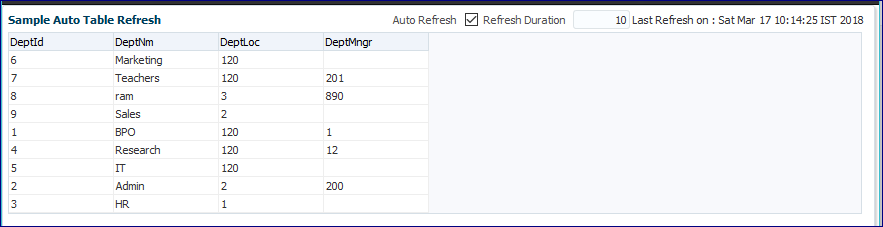
drop a viewObject as a table on a page.
Here is the page.

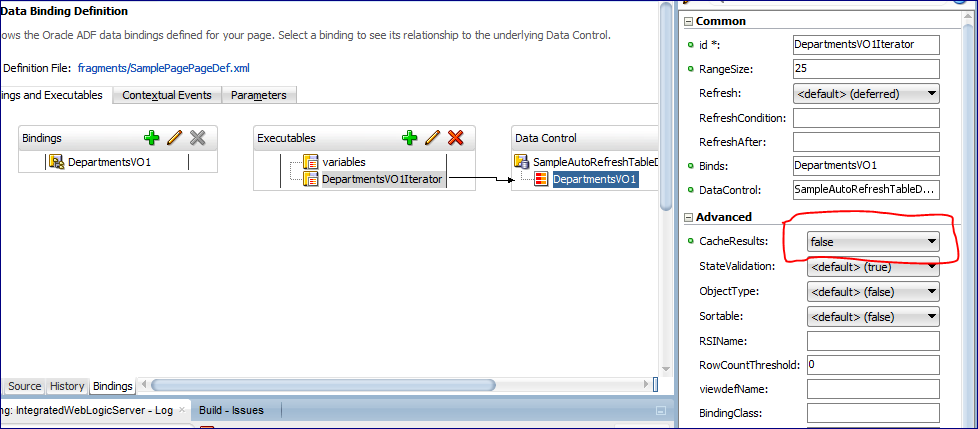
Correction : To refresh the table on every refresh we will have to disable the cache from the Table Iterator.[This step can pe skipped].

After that when we run the application.

After that, we change the data in the database.

Then when a poll is called then the department name Admin changed to Admin New

Here is the code of the Page used in this project.
Here is the page.
Correction : To refresh the table on every refresh we will have to disable the cache from the Table Iterator.[This step can pe skipped].
After that when we run the application.

After that, we change the data in the database.

Then when a poll is called then the department name Admin changed to Admin New

Here is the code of the Page used in this project.
<af:panelBox text="Sample Auto Table Refresh" id="pb1" showDisclosure="false">
    <f:facet name="toolbar">
      <af:toolbar id="t2">
        <af:selectBooleanCheckbox label="Auto Refresh" id="sbc1"
                                  value="#{viewScope.smplPageRefreshBean.autoRefreshEnabled}"
                                  autoSubmit="true"/>
        <af:inputText label="Refresh Duration" id="it1" contentStyle="width:50px;"
                      value="#{viewScope.smplPageRefreshBean.refreshDuration}" autoSubmit="true"
                      partialTriggers="sbc1" visible="#{viewScope.smplPageRefreshBean.pollOn}"/>
        <af:outputText value="Last Refresh on : #{viewScope.smplPageRefreshBean.lastRefreshedOn}" id="ot5"
                       partialTriggers="sbc1 p1" visible="#{viewScope.smplPageRefreshBean.pollOn}"/>
      </af:toolbar>
    </f:facet>
    <af:panelGroupLayout id="pgl1" layout="vertical">
      <af:poll id="p1" interval="#{viewScope.smplPageRefreshBean.pollDuration}" partialTriggers="sbc1"
               pollListener="#{viewScope.smplPageRefreshBean.pollListner}"/>
      <af:table value="#{bindings.DepartmentsVO1.collectionModel}" var="row" rows="#{bindings.DepartmentsVO1.rangeSize}"
                emptyText="#{bindings.DepartmentsVO1.viewable ? 'No data to display.' : 'Access Denied.'}"
                rowBandingInterval="0" selectedRowKeys="#{bindings.DepartmentsVO1.collectionModel.selectedRow}"
                selectionListener="#{bindings.DepartmentsVO1.collectionModel.makeCurrent}" rowSelection="single"
                fetchSize="#{bindings.DepartmentsVO1.rangeSize}" id="t1" partialTriggers="::sbc1 ::p1" autoHeightRows="10"
                styleClass="AFStretchWidth">
        <af:column headerText="#{bindings.DepartmentsVO1.hints.DeptId.label}" id="c1">
          <af:outputText value="#{row.DeptId}" shortDesc="#{bindings.DepartmentsVO1.hints.DeptId.tooltip}" id="ot1">
            <af:convertNumber groupingUsed="false" pattern="#{bindings.DepartmentsVO1.hints.DeptId.format}"/>
          </af:outputText>
        </af:column>
        <af:column headerText="#{bindings.DepartmentsVO1.hints.DeptNm.label}" id="c2">
          <af:outputText value="#{row.DeptNm}" shortDesc="#{bindings.DepartmentsVO1.hints.DeptNm.tooltip}" id="ot2"/>
        </af:column>
        <af:column headerText="#{bindings.DepartmentsVO1.hints.DeptLoc.label}" id="c3">
          <af:outputText value="#{row.DeptLoc}" shortDesc="#{bindings.DepartmentsVO1.hints.DeptLoc.tooltip}" id="ot3">
            <af:convertNumber groupingUsed="false" pattern="#{bindings.DepartmentsVO1.hints.DeptLoc.format}"/>
          </af:outputText>
        </af:column>
        <af:column headerText="#{bindings.DepartmentsVO1.hints.DeptMngr.label}" id="c4">
          <af:outputText value="#{row.DeptMngr}" shortDesc="#{bindings.DepartmentsVO1.hints.DeptMngr.tooltip}" id="ot4">
            <af:convertNumber groupingUsed="false" pattern="#{bindings.DepartmentsVO1.hints.DeptMngr.format}"/>
          </af:outputText>
        </af:column>
      </af:table>
    </af:panelGroupLayout>
And in the Bean.
package sampleautorefreshtable.adfjavacodes.view.bean;

import java.util.Date;

import javax.faces.application.FacesMessage;

import oracle.adf.model.BindingContext;

import oracle.binding.OperationBinding;

import org.apache.myfaces.trinidad.event.PollEvent;

public class smplPageRefreshBean {
    // To decide if refresh is enabled or not
    private boolean autoRefreshEnabled = false;
    // To decide the last refreshed time
    private Date lastRefreshedOn = new Date(System.currentTimeMillis());
    // To decide refresh time interval in seconds
    private long refreshDuration = 10;
    // To set poll to on or off
    private boolean pollOn = false;

    public boolean isPollOn() {
        return pollOn;
    }

    public smplPageRefreshBean() {
    }

    public void setAutoRefreshEnabled(boolean autoRefreshEnabled) {
        if (autoRefreshEnabled) {
            pollOn = true;
            refreshDuration = 10;
        } else {
            pollOn = false;
        }
        this.autoRefreshEnabled = autoRefreshEnabled;
    }

    public boolean isAutoRefreshEnabled() {
        return autoRefreshEnabled;
    }

    public void setLastRefreshedOn(Date lastRefreshedOn) {
        this.lastRefreshedOn = lastRefreshedOn;
    }

    public Date getLastRefreshedOn() {
        return lastRefreshedOn;
    }

    public void setRefreshDuration(long refreshDuration) {
        this.refreshDuration = refreshDuration;
    }

    public long getRefreshDuration() {
        return refreshDuration;
    }

    public long getPollDuration() {
        return (pollOn ? refreshDuration * 1000 : -1);
    }

    public void pollListner(PollEvent pollEvent) {
        OperationBinding o = BindingContext.getCurrent().getCurrentBindingsEntry().getOperationBinding("Execute");
        o.execute();
        System.out.println("refreshed");
        lastRefreshedOn = new Date(System.currentTimeMillis());
    }
}
You can find the sample project here: SampleAutoRefreshTable
Thanks!
References : http://pamkoertshuis.blogspot.in/2016/01/auto-refresh-op-table-in-adf.html


