Showing posts with label LOV. Show all posts

Monday, 30 November 2015

how to populate Single or Multiple Selection Lov(List of Values) from Bean in ADF

Hello all,

This shows how we can populate the values of Single or Multiple Selection List of values from Bean.
For this simply create a simple ADF Application.

  1. Then create a Bean with a method public ArrayList<SelectionList> getSelectionListItems();
    package singleselectionlovfrombean.view.bean;
    
    import java.util.ArrayList;
    
    import javax.faces.event.ActionEvent;
    import javax.faces.model.SelectItem;
    
    import oracle.adf.view.rich.component.rich.input.RichSelectManyChoice;
    
    public class TestBean {
        private ArrayList<String> list = new ArrayList<String>();
        private RichSelectManyChoice multSelctBind;
    
        public TestBean() {
            list.add("Second Option");
            list.add("Third Option");
            list.add("Fourth Option");
            list.add("Fifth Option");
        }
    
        public void showSelectedValuesAL(ActionEvent actionEvent) {
            Object object = multSelctBind.getValue();
            System.out.println("Selected Values are : "+object);
        }
    
        public ArrayList<SelectItem> getSelectionListItems() {
            ArrayList<SelectItem> sslist = new ArrayList<SelectItem>();
            for (String s : list) {
                sslist.add(new SelectItem(s, s, s, false));
            }
            return sslist;
        }
    
        public void setMultSelctBind(RichSelectManyChoice multSelctBind) {
            this.multSelctBind = multSelctBind;
        }
    
        public RichSelectManyChoice getMultSelctBind() {
            return multSelctBind;
        }
    }
    
  2. Create a .jspx page and the drag a multiple selection list of Values form component pallet.
  3. This method returns an ArrayList of SelectionList type which we will use for the purpose of showing the values in the list box.

  4. Then select the method returning items by clicking on the Bind


Then press okey.


And Here I also have created a ActionEvent in a button that shows the selected values.

Then run the application.

The pages opens are follows


After the selection click on  Show Selected Values button.


Am attaching the sample application for reference : SingleSelectionLovFromBeanAPP
Please comment for any query or Confusion.

Friday, 11 April 2014

ADF : Filtering ListOfValues Effectively, Best way to filter an LOV

Hello all,

This is an initial level post, but still thinks can get tricky at times, so i thought of sharing this.

Here I will try to demonstrate how we can filter the values of an LOV effectively.
First we need to know about what happens when an LOV is added on an attribute in a viewObject.

When a LOV is added on an attribute then an instance of the viewObject ( which is used for creating LOV ) is created and that is added to the attribute as an LOV. This instance is attached to the parent viewObject.
Let us take an example,
Suppose we have to show departments in place of department Id in EmployeeViewObject made from Employees Table.
For doing so we will have create a viewObject containing DeptId and DepartmentName, we can name it LovDeptVO. Then we will select the departmentId field in EmployeeViewObject and add LOV and select LovDeptVO viewObject and do attribute mapping , at this time an instance of viewObject LovDeptVO is created and added to EmployeeViewObject. And then you can view the instance of the lov in viewAccessors Tab of EmployeeViewObject.

So now we come to filtering the LOV on somevalues.

There are two cases :

1. Filtering LOV with the attribute present in the same ViewObject.
We have to create a viewCriteria in the lov ViewObject and pass values to bind variables from the viewObject which contains the LOV.
Let us take an example ;

I have created an ADF Applcation with HR Schema.

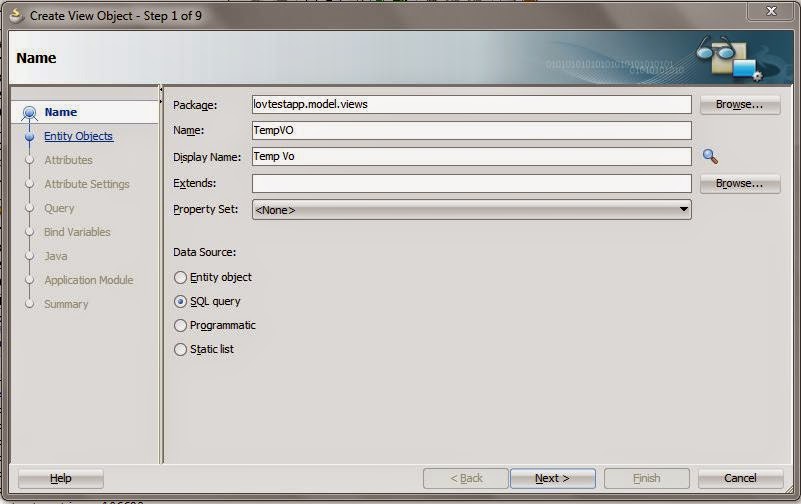
Then created a temprory viewObject containing two attributes departmentId and EmployeeId.


Then we have to create EmployeeViewObject to make LOV from it.


Now go to Query Tab and create a viewCriteria filtering the LOVEmployeeVo with DeptId. So now LOV viewObject is also complete.

Now we have to make LOV in the EmployeeId in TempVO. Select the EmployeeId attribute go to ListOfValues section and add an lov by clicking add button.

Now we have to pass the selected DepartmentID to LOV so that i can be filtered. So go to the viewAccessors tab in TempVO. You will see the LOV instance there.
Click edit and pass the values. Drag the available viewCriteia to the left and pass the value to the bindVariable.


New Create a page and drop the TempVO as a form. Set Autosubmit value of DepartmentId field to true. And add partial trigger on EmployeeId attribute to refresh the LOV when value of Department changes.


2. Filtering LOV with the attribute present outside the ViewOject i.e. filtering LOV from outside.

So in the above case we had to filter the lov from the attribute from the ViewObject containing Lov, i mean EmployeeId and DepartmentId both fields were in the same ViewObject. How will we filter when we have to filter the LOV on the basis of value coming from a diffferent ViewObject.

For this purpose i created a text field on the page and created a button to filter the LOV.
For that I have created a method in AmImpl and called it in the bean by adding it to client interface.
Method in AMImpl .
And In Bean I have called the Method in AM


On Running the application


When DepartmentId is entered as 10 and filterLov button is clicked


You can download the sample Application here : LovTestApp.rar

Tuesday, 8 April 2014

ADF : Making three level dependent LOV (List Of Values)

Hello all,

During the development we often come across a scenario in which we need to filter the List Of Values dependent on other List Of Values. Suppose you want only the cities of the selected country.

Here am about to show how we can make a three level dependent ListOfValues.
I will make a LOV which the user will select a location from locationLOV , then the other departmentLOV will show the department of the selected location, then the user will select a department and the employeeLOV will show the Employees of the selected department.

So, I have created an ADF application and made a connection to HR Schema. Also created three viewObject LovDepartmentVO,LovLocationsVO and LovEmployeeVO to make LOV's.

Now our main purpose is to filter the department on the basis of locations and employees on the basis of department.

For that we have to create a viewCritria in DepartmentsVo to filter departments on the basis of locations.


And then create view criteria for EmployeesVO.


Now we have viewObjects for LOV ready, we need to make a viewObject on whose attributes we will put these lovs.

So here I am creating a query from dual.
And then add three transient attributes as location , department and employees.
Make sure that property "updatable" is true.


Select locationsTrans and go to List of Values and add the lov by selecting LovLocationsVO.
Select departmentTrans and make a lov from lovDepartmentsVO.
Now go to view Accessors tab of the TemporaryVO you will see the lovs added to temporaryVO, now select the lovDepartment and click on edit button.

Select the viewCritera and in the bind value parameters select locationsTrans as value. This will filter the departments Lov on the basis of selecetd location.

Now add the lov on employeesTrans too and then go to viewAccessors select and mapp the bindVarible value to departmentTrans.


Now create am Applicaiton Module and add temporaryVo to AM and create a page and drag all the three attributes in the page and run the application.

Run the page and Select LocationTrans as London, then you will see DepartmentTrans filtered and you will see only 'Humar Resource' department in the lov as it resides in London. And in EmployeeTrans you will see Employees of Selected  department.


Make sure that the all the attribute have their autosubmit attribute to 'true' and attributes are partial trigged on basis of the source.

And the most important thing is that this technique will work on when the three attributes are on the same viewObject.. like in this case is the TemporaryVO.

You can Download the sample from here DependentLovTest.jar

If you have any questions regarding this, feel free to ask.


Friday, 4 April 2014

ADF : af:table or adf form or adf page taking too much time to load

During the development sometimes we come across this problem. In our case we had a table on a page and it was taking too much time to load, even though there were only one row in the database table but then also it was taking more than enough time to load. After the analysing the problem finally we were able to solved the problem.

The main problem was with the List of Values with SingleSelection which was inserted in the table. In a column we had to show the name in place of the id, so the developer created a List of Values in the viewObject and put it in the table on page. At first it was working fine but later as the number of rows grown in the List of values the list started taking time to load.

The main cause was the number of rows in the list of values. Single selection list of values matches the id with the value and shows values, so inorder to map it needs all the rows, so whenever the table was being load the ListOfValues started to fetch all the rows, and as the number of rows was too much so abviously it was taking too much time. So, we had to replace the list of values but we also had to show the name in place of id. 

So there are many ways to do that : 

1. We can include the name that we have to display in the query of the table itself, because of which we can simply display it in a column.

2. Otherwise we have to use a viewobject with query that returns a less number of rows and better if it returns one row with the id and DisplayName. 
Suppose we have to show Department Name in place of department id in Employees Table. The query will be something like this : SELECT DEPARTMENT_NAME FROM DEPARTMENTS WHERE DEPARTMENT_ID = :DeptIdBind

And then we need to show the display name so we created a transient attribute.
Then in the getter of the transient attribute, get the viewObject and pass the bindVariables and execute the query. The query will return a row and then we can fetch the name from the view object and show it by returning it.

There is a disadvantage of using this method, as the query is executed for all the rows fetched in the table. But page load problem will be solved. 

This may depend on the use case.  For us both worked well.

I will suggest never to use SingleSelection List of Values that contains large number of rows in the page. Not even on the adf form. Because due to that it will take too much time to load.

Thanks for reading. If you have any question, Please feel free to ask.