Monday, 2 September 2013

Following the MVC Architecture in ADF, AMImpl method Called in Managed Bean

Hello everyone,

Here am about to explain how we can optimize our application for performance in ADF. ADF follows MVC architecture for application development.So there are times when we need an instance of model impl classes in the bean such as for example: we need AppModuleImpl in our bean class to get or fetch value from a view object. So for that we have to create an AppModuleImpl instance in the bean and then get viewObject from that.

So, if we get the AppModuleImpl object in bean then the purpose of MVC is being violated.I mean then we would be merging the model and viewController separation. And further more new instances of AppModuleImpl and etc, will created in our Managed Bean, this adds to violation of MVC Architecture . So it is better to keep the database logic in the database layer i.e. model and keep the controller logic in in viewController.

So the problem is that if we have to interact with the model layer from the bean, then how shall we do it?

The answer to this question is the use of ADF bindings.
Binding is used to interact with model layer from the viewController layer.

Suppose in a scenario, just for example we have to get the location of the employee by using EmployeeId. This needs interaction with the model layer.

So to do that we have to create a method that will take EmployeeId as input and give back location in return. 

  1. Go to the AppModuleImpl and create a method.

    **Please do not use "Object" type in return parameter or in inputParameter,if you do this then the method will not be shown in ClientInterface**
        public Integer getLoc(Integer EmpId){
            Integer sal = null;
            Row[] row_2 = this.getEmployee1().getFilteredRows("EmployeeId", EmpId);
            if(row_2.length>0){
                sal = Integer.parseInt(row_2[0].getAttribute("Salary").toString());
            }
            return sal;
        }


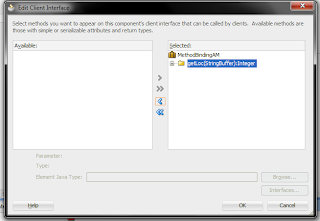
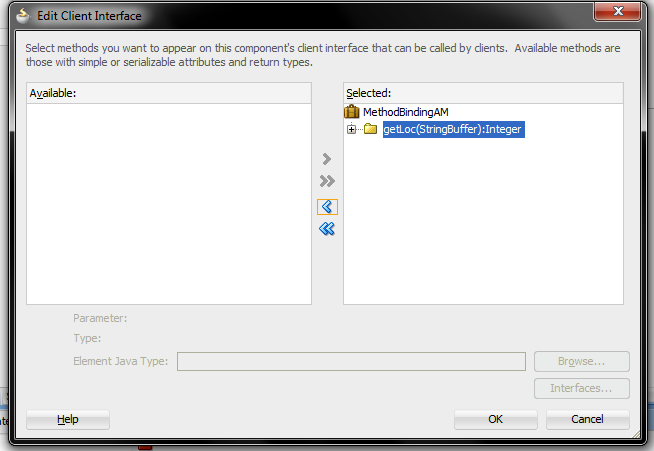
  2. Then go to clientInterface of the AM and add the method to clientInterface.


  3. Then you have to create binding for this method on the page.
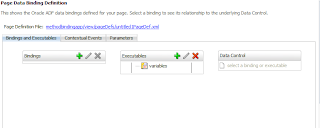


  4. Now we have to call this binding and put the parameters in it from the bean.
        public void fetchSalary(ActionEvent actionEvent) {
            OperationBinding binding = getBindings().getOperationBinding("getLoc");
            // to put parameters value in the method
            binding.getParamsMap().put("EmpId", empId);
            Object execute = binding.execute();
            salary  = (Integer) execute;
        }


  5. Now when you run the application.


    and when Fetch Salary button is clicked

  6. You can download the sample application here : MethodBindingApp.rar.
  7. If you have any query regarding this, please write in the comments. 

Friday, 26 July 2013

How to use single input field to search in different columns in oracle ADF Application.

In ADF we can create search in tables using viewcriteria. ViewCriteria can be used to perform any kind of search or criteria on the ViewCriteria. The main idea behind single inputtext search is to put or operator in the viewCriteria or query, and to compare the columns with the approriate datatype. Here i have created common search for departmentId, employeeId, firstname, lastName, PhoneNumber, Salary and JobId column.

Here i have used Employee table of hr schema to demonstrate single point search on the whole table. 

So, for this simply create a simple ADF application and connect it to database using hr schema.
  1. For this we need employee view, here we are using readonly viewObject beacause we just have to display the information. Create bind variables as shown in the picture. Here i have created 6 bind variable to perform search on 7 columns of the employee table.

     
  2.  Now create a viewCriteria as shown below.

     
    <ViewCriteria
        Name="EmployeeVOCriteria"
        ViewObjectName="singleboxsearch.model.EmployeeVO"
        Conjunction="AND">
        <Properties>
          <CustomProperties>
            <Property
              Name="displayOperators"
              Value="InAdvancedMode"/>
            <Property
              Name="autoExecute"
              Value="false"/>
            <Property
              Name="allowConjunctionOverride"
              Value="true"/>
            <Property
              Name="showInList"
              Value="true"/>
            <Property
              Name="mode"
              Value="Basic"/>
          </CustomProperties>
        </Properties>
        <ViewCriteriaRow
          Name="EmployeeVOCriteria_row_0"
          UpperColumns="1">
          <ViewCriteriaItem
            Name="EmployeeId"
            ViewAttribute="EmployeeId"
            Operator="="
            Conjunction="AND"
            Value=":EmpIdBind"
            IsBindVarValue="true"
            Required="Optional"/>
          <ViewCriteriaItem
            Name="FirstName"
            ViewAttribute="FirstName"
            Operator="CONTAINS"
            Conjunction="OR"
            Value=":NameBind"
            IsBindVarValue="true"
            Required="Optional"/>
          <ViewCriteriaItem
            Name="LastName"
            ViewAttribute="LastName"
            Operator="CONTAINS"
            Conjunction="OR"
            Value=":NameBind"
            IsBindVarValue="true"
            Required="Optional"/>
          <ViewCriteriaItem
            Name="PhoneNumber"
            ViewAttribute="PhoneNumber"
            Operator="CONTAINS"
            Conjunction="OR"
            Value=":PhoneNumBind"
            IsBindVarValue="true"
            Required="Optional"/>
          <ViewCriteriaItem
            Name="Salary"
            ViewAttribute="Salary"
            Operator="="
            Conjunction="OR"
            Value=":SalaryBind"
            IsBindVarValue="true"
            Required="Optional"/>
          <ViewCriteriaItem
            Name="DepartmentId"
            ViewAttribute="DepartmentId"
            Operator="="
            Conjunction="OR"
            Value=":DeptIdBind"
            IsBindVarValue="true"
            Required="Optional"/>
        </ViewCriteriaRow>
      </ViewCriteria> 


  3. Now we need a page to display the search. So i just created a jspx page and drag the table onto it and put 1 inputTextBox and 2 buttons. 1 for search and the other for reset action. Here is the xml code of the jspx page.
    <?xml version='1.0' encoding='UTF-8'?>
    <jsp:root xmlns:jsp="http://java.sun.com/JSP/Page" version="2.1" xmlns:f="http://java.sun.com/jsf/core"
              xmlns:af="http://xmlns.oracle.com/adf/faces/rich">
        <jsp:directive.page contentType="text/html;charset=UTF-8"/>
        <f:view>
            <af:document title="untitled1" id="d1">
                <af:form id="f1">
                    <af:panelBox id="pb1" showDisclosure="false">
                        <f:facet name="toolbar"/>
                        <af:panelGroupLayout id="pgl1" layout="horizontal">
                            <af:inputText label="Search" id="it11" labelStyle="color:black;font-weight:bold;"
                                          binding="#{SingleBoxSearch.searchBox_IT_Bind}"/>
                            <af:commandButton text="Search" id="cb1" inlineStyle="font-weight:bold;"
                                              actionListener="#{SingleBoxSearch.searchACTION}"/>
                            <af:commandButton text="Reset" id="cb2" inlineStyle="font-weight:bold;"
                                              actionListener="#{SingleBoxSearch.resetACTION}"/>
                        </af:panelGroupLayout>
                    </af:panelBox>
                    <af:panelCollection id="pc1" styleClass="AFStretchWidth">
                        <f:facet name="menus"/>
                        <f:facet name="toolbar"/>
                        <f:facet name="statusbar"/>
                        <af:table value="#{bindings.EmployeeVO1.collectionModel}" var="row"
                                  rows="#{bindings.EmployeeVO1.rangeSize}"
                                  emptyText="#{bindings.EmployeeVO1.viewable ? 'No data to display.' : 'Access Denied.'}"
                                  fetchSize="#{bindings.EmployeeVO1.rangeSize}" rowBandingInterval="0"
                                  selectedRowKeys="#{bindings.EmployeeVO1.collectionModel.selectedRow}"
                                  selectionListener="#{bindings.EmployeeVO1.collectionModel.makeCurrent}"
                                  rowSelection="single" id="t1" styleClass="AFStretchWidth">
                            <af:column sortProperty="#{bindings.EmployeeVO1.hints.EmployeeId.name}" sortable="false"
                                       headerText="#{bindings.EmployeeVO1.hints.EmployeeId.label}" id="c1">
                                <af:inputText value="#{row.bindings.EmployeeId.inputValue}"
                                              label="#{bindings.EmployeeVO1.hints.EmployeeId.label}"
                                              required="#{bindings.EmployeeVO1.hints.EmployeeId.mandatory}"
                                              columns="#{bindings.EmployeeVO1.hints.EmployeeId.displayWidth}"
                                              maximumLength="#{bindings.EmployeeVO1.hints.EmployeeId.precision}"
                                              shortDesc="#{bindings.EmployeeVO1.hints.EmployeeId.tooltip}" id="it1"
                                              readOnly="true">
                                    <f:validator binding="#{row.bindings.EmployeeId.validator}"/>
                                    <af:convertNumber groupingUsed="false"
                                                      pattern="#{bindings.EmployeeVO1.hints.EmployeeId.format}"/>
                                </af:inputText>
                            </af:column>
                            <af:column sortProperty="#{bindings.EmployeeVO1.hints.FirstName.name}" sortable="false"
                                       headerText="#{bindings.EmployeeVO1.hints.FirstName.label}" id="c2">
                                <af:inputText value="#{row.bindings.FirstName.inputValue}"
                                              label="#{bindings.EmployeeVO1.hints.FirstName.label}"
                                              required="#{bindings.EmployeeVO1.hints.FirstName.mandatory}"
                                              columns="#{bindings.EmployeeVO1.hints.FirstName.displayWidth}"
                                              maximumLength="#{bindings.EmployeeVO1.hints.FirstName.precision}"
                                              shortDesc="#{bindings.EmployeeVO1.hints.FirstName.tooltip}" id="it2"
                                              readOnly="true">
                                    <f:validator binding="#{row.bindings.FirstName.validator}"/>
                                </af:inputText>
                            </af:column>
                            <af:column sortProperty="#{bindings.EmployeeVO1.hints.LastName.name}" sortable="false"
                                       headerText="#{bindings.EmployeeVO1.hints.LastName.label}" id="c3">
                                <af:inputText value="#{row.bindings.LastName.inputValue}"
                                              label="#{bindings.EmployeeVO1.hints.LastName.label}"
                                              required="#{bindings.EmployeeVO1.hints.LastName.mandatory}"
                                              columns="#{bindings.EmployeeVO1.hints.LastName.displayWidth}"
                                              maximumLength="#{bindings.EmployeeVO1.hints.LastName.precision}"
                                              shortDesc="#{bindings.EmployeeVO1.hints.LastName.tooltip}" id="it3"
                                              readOnly="true">
                                    <f:validator binding="#{row.bindings.LastName.validator}"/>
                                </af:inputText>
                            </af:column>
                            <af:column sortProperty="#{bindings.EmployeeVO1.hints.Email.name}" sortable="false"
                                       headerText="#{bindings.EmployeeVO1.hints.Email.label}" id="c4">
                                <af:inputText value="#{row.bindings.Email.inputValue}"
                                              label="#{bindings.EmployeeVO1.hints.Email.label}"
                                              required="#{bindings.EmployeeVO1.hints.Email.mandatory}"
                                              columns="#{bindings.EmployeeVO1.hints.Email.displayWidth}"
                                              maximumLength="#{bindings.EmployeeVO1.hints.Email.precision}"
                                              shortDesc="#{bindings.EmployeeVO1.hints.Email.tooltip}" id="it4"
                                              readOnly="true">
                                    <f:validator binding="#{row.bindings.Email.validator}"/>
                                </af:inputText>
                            </af:column>
                            <af:column sortProperty="#{bindings.EmployeeVO1.hints.PhoneNumber.name}" sortable="false"
                                       headerText="#{bindings.EmployeeVO1.hints.PhoneNumber.label}" id="c5">
                                <af:inputText value="#{row.bindings.PhoneNumber.inputValue}"
                                              label="#{bindings.EmployeeVO1.hints.PhoneNumber.label}"
                                              required="#{bindings.EmployeeVO1.hints.PhoneNumber.mandatory}"
                                              columns="#{bindings.EmployeeVO1.hints.PhoneNumber.displayWidth}"
                                              maximumLength="#{bindings.EmployeeVO1.hints.PhoneNumber.precision}"
                                              shortDesc="#{bindings.EmployeeVO1.hints.PhoneNumber.tooltip}" id="it5"
                                              readOnly="true">
                                    <f:validator binding="#{row.bindings.PhoneNumber.validator}"/>
                                </af:inputText>
                            </af:column>
                            <af:column sortProperty="#{bindings.EmployeeVO1.hints.HireDate.name}" sortable="false"
                                       headerText="#{bindings.EmployeeVO1.hints.HireDate.label}" id="c6">
                                <af:inputDate value="#{row.bindings.HireDate.inputValue}"
                                              label="#{bindings.EmployeeVO1.hints.HireDate.label}"
                                              required="#{bindings.EmployeeVO1.hints.HireDate.mandatory}"
                                              columns="#{bindings.EmployeeVO1.hints.HireDate.displayWidth}"
                                              shortDesc="#{bindings.EmployeeVO1.hints.HireDate.tooltip}" id="id1"
                                              readOnly="true">
                                    <f:validator binding="#{row.bindings.HireDate.validator}"/>
                                    <af:convertDateTime pattern="#{bindings.EmployeeVO1.hints.HireDate.format}"/>
                                </af:inputDate>
                            </af:column>
                            <af:column sortProperty="#{bindings.EmployeeVO1.hints.JobId.name}" sortable="false"
                                       headerText="#{bindings.EmployeeVO1.hints.JobId.label}" id="c7">
                                <af:inputText value="#{row.bindings.JobId.inputValue}"
                                              label="#{bindings.EmployeeVO1.hints.JobId.label}"
                                              required="#{bindings.EmployeeVO1.hints.JobId.mandatory}"
                                              columns="#{bindings.EmployeeVO1.hints.JobId.displayWidth}"
                                              maximumLength="#{bindings.EmployeeVO1.hints.JobId.precision}"
                                              shortDesc="#{bindings.EmployeeVO1.hints.JobId.tooltip}" id="it6"
                                              readOnly="true">
                                    <f:validator binding="#{row.bindings.JobId.validator}"/>
                                </af:inputText>
                            </af:column>
                            <af:column sortProperty="#{bindings.EmployeeVO1.hints.Salary.name}" sortable="false"
                                       headerText="#{bindings.EmployeeVO1.hints.Salary.label}" id="c8">
                                <af:inputText value="#{row.bindings.Salary.inputValue}"
                                              label="#{bindings.EmployeeVO1.hints.Salary.label}"
                                              required="#{bindings.EmployeeVO1.hints.Salary.mandatory}"
                                              columns="#{bindings.EmployeeVO1.hints.Salary.displayWidth}"
                                              maximumLength="#{bindings.EmployeeVO1.hints.Salary.precision}"
                                              shortDesc="#{bindings.EmployeeVO1.hints.Salary.tooltip}" id="it7"
                                              readOnly="true">
                                    <f:validator binding="#{row.bindings.Salary.validator}"/>
                                </af:inputText>
                            </af:column>
                            <af:column sortProperty="#{bindings.EmployeeVO1.hints.CommissionPct.name}" sortable="false"
                                       headerText="#{bindings.EmployeeVO1.hints.CommissionPct.label}" id="c9">
                                <af:inputText value="#{row.bindings.CommissionPct.inputValue}"
                                              label="#{bindings.EmployeeVO1.hints.CommissionPct.label}"
                                              required="#{bindings.EmployeeVO1.hints.CommissionPct.mandatory}"
                                              columns="#{bindings.EmployeeVO1.hints.CommissionPct.displayWidth}"
                                              maximumLength="#{bindings.EmployeeVO1.hints.CommissionPct.precision}"
                                              shortDesc="#{bindings.EmployeeVO1.hints.CommissionPct.tooltip}" id="it8"
                                              readOnly="true">
                                    <f:validator binding="#{row.bindings.CommissionPct.validator}"/>
                                </af:inputText>
                            </af:column>
                            <af:column sortProperty="#{bindings.EmployeeVO1.hints.ManagerId.name}" sortable="false"
                                       headerText="#{bindings.EmployeeVO1.hints.ManagerId.label}" id="c10">
                                <af:inputText value="#{row.bindings.ManagerId.inputValue}"
                                              label="#{bindings.EmployeeVO1.hints.ManagerId.label}"
                                              required="#{bindings.EmployeeVO1.hints.ManagerId.mandatory}"
                                              columns="#{bindings.EmployeeVO1.hints.ManagerId.displayWidth}"
                                              maximumLength="#{bindings.EmployeeVO1.hints.ManagerId.precision}"
                                              shortDesc="#{bindings.EmployeeVO1.hints.ManagerId.tooltip}" id="it9"
                                              readOnly="true">
                                    <f:validator binding="#{row.bindings.ManagerId.validator}"/>
                                    <af:convertNumber groupingUsed="false"
                                                      pattern="#{bindings.EmployeeVO1.hints.ManagerId.format}"/>
                                </af:inputText>
                            </af:column>
                            <af:column sortProperty="#{bindings.EmployeeVO1.hints.DepartmentId.name}" sortable="false"
                                       headerText="#{bindings.EmployeeVO1.hints.DepartmentId.label}" id="c11">
                                <af:inputText value="#{row.bindings.DepartmentId.inputValue}"
                                              label="#{bindings.EmployeeVO1.hints.DepartmentId.label}"
                                              required="#{bindings.EmployeeVO1.hints.DepartmentId.mandatory}"
                                              columns="#{bindings.EmployeeVO1.hints.DepartmentId.displayWidth}"
                                              maximumLength="#{bindings.EmployeeVO1.hints.DepartmentId.precision}"
                                              shortDesc="#{bindings.EmployeeVO1.hints.DepartmentId.tooltip}" id="it10"
                                              readOnly="true">
                                    <f:validator binding="#{row.bindings.DepartmentId.validator}"/>
                                    <af:convertNumber groupingUsed="false"
                                                      pattern="#{bindings.EmployeeVO1.hints.DepartmentId.format}"/>
                                </af:inputText>
                            </af:column>
                        </af:table>
                    </af:panelCollection>
                </af:form>
            </af:document>
        </f:view>
    </jsp:root> 
     
  4. The java code used to search is given below. In this i have used "employeesSearch.setNamedWhereClauseParam("NameBind", searchBox_IT_Bind.getValue());" to set the values to the bind variables.
    package singleboxsearch.view;
    
    import java.io.Serializable;
    
    import javax.el.ELContext;
    import javax.el.ExpressionFactory;
    import javax.el.ValueExpression;
    
    import javax.faces.application.Application;
    import javax.faces.context.FacesContext;
    import javax.faces.event.ActionEvent;
    
    import oracle.adf.view.rich.component.rich.input.RichInputText;
    
    import oracle.jbo.server.ViewObjectImpl;
    
    import singleboxsearch.model.SingleBoxSearchAMImpl;
    
    public class SingleBoxSearch implements Serializable {
        private RichInputText searchBox_IT_Bind;
        SingleBoxSearchAMImpl am;
    
        public SingleBoxSearch() {
        }
    
        public void setSearchBox_IT_Bind(RichInputText searchBox_IT_Bind) {
            this.searchBox_IT_Bind = searchBox_IT_Bind;
        }
    
        public RichInputText getSearchBox_IT_Bind() {
            return searchBox_IT_Bind;
        }
    
        public void searchACTION(ActionEvent actionEvent) {
            System.out.println(searchBox_IT_Bind.getValue());
            if(this.searchBox_IT_Bind.getValue() != null){
                Integer val = 0;
                try{
                    val = Integer.parseInt(this.searchBox_IT_Bind.getValue().toString()) ;
                }catch(Exception e){
                    val = -1;
                    System.out.println(e.getMessage());
                }
                ViewObjectImpl employeesSearch = this.getAppModule().getEmployeeVO1();
                employeesSearch.setNamedWhereClauseParam("NameBind", searchBox_IT_Bind.getValue());
                employeesSearch.setNamedWhereClauseParam("PhoneNumBind", searchBox_IT_Bind.getValue());
                employeesSearch.setNamedWhereClauseParam("JobIdBind", searchBox_IT_Bind.getValue());
                if(val != -1){
                employeesSearch.setNamedWhereClauseParam("EmpIdBind", val);
                employeesSearch.setNamedWhereClauseParam("DeptIdBind", val);
                employeesSearch.setNamedWhereClauseParam("SalaryBind", val);
                }
                employeesSearch.executeQuery();
            }
        }
    
        public void resetACTION(ActionEvent actionEvent) {
            this.searchBox_IT_Bind.setValue(null);
            ViewObjectImpl employeesSearch = this.getAppModule().getEmployeeVO1();
            employeesSearch.setNamedWhereClauseParam("NameBind", null);
            employeesSearch.setNamedWhereClauseParam("EmpIdBind", null);
            employeesSearch.setNamedWhereClauseParam("DeptIdBind", null);
            employeesSearch.setNamedWhereClauseParam("PhoneNumBind", null);
            employeesSearch.setNamedWhereClauseParam("JobIdBind", null);
            employeesSearch.setNamedWhereClauseParam("SalaryBind", null);
            employeesSearch.executeQuery();
        }
        public SingleBoxSearchAMImpl getAppModule(){
            if(am == null){
                am = (SingleBoxSearchAMImpl)resolvElDC("SingleBoxSearchAMDataControl");
                return am;
            }else{
                return am;
            }
        }
        public Object resolvElDC(String data) {
            FacesContext fc = FacesContext.getCurrentInstance();
            Application app = fc.getApplication();
            ExpressionFactory elFactory = app.getExpressionFactory();
            ELContext elContext = fc.getELContext();
            ValueExpression valueExp =
                elFactory.createValueExpression(elContext, "#{data." + data + ".dataProvider}", Object.class);
            return valueExp.getValue(elContext);
        } 
    } 
     
  5. Now run the application and search in the page. Here i have search with dept id 50, means search all the employees whose deptId is 50.

  6. Here i have search for name.

  7. Here i have searched for salary 2600.

  8. You can download sample application from here : SingleSearch.jar