Wednesday, 4 December 2013

ADF : How ViewObjects (VO) get executed ? | View Object LifeCycle

View Objects are esssential part of ADF Business Components . These are associated with represention of DataSet.
ViewObjects contains a Query which when executed returns a set of results in form of rows. Then the view Object convert the rows returned from the query to ADF undestandable form i.e. ViewObjectRowImpl form.
So, the question is what happens when a viewObject gets a call?

ViewObject goes through a series of methods before representing a dataset. In other words we can name it ViewObject LifeCycle .


LifeCycle

When a viewObject is called the following methods are executed in the given sequence.
  • At first when the viewObject is first executed the method first called in the ViewObjectImpl is
    executeQueryForCollection(Object qc, Object[] params, int noUserParams)
    This method executes the Database Query in the viewObject and then calls the next method.

  • After executeQueryForCollection is executed then method hasNextForCollection(Object qc) is called. This method checks if the collection returned have a row or not. If hasNextForCollection(Object qc) returns True then the next method of the lifeCycle is called which converts the row to ADF understandable form i.e. into ViewObjectRowImpl from.

  • So when method hasNextForCollection retuns true then method createRowFromResultSet(Object qc, ResultSet resultSet) is called and this method converts the row into ADF understandable form.

  • This goes on until all the rows are covered and there is no rows left in collection. When there are no rows in the collection then the method hasNextForCollection returns false .

  • Then method setFetchCompleteForCollection(java.lang.Object qc,boolean val) is called and it sets the flag for fetch completion. This indicates that the rows from the collection are fetched.


Here is a diagrammatic representation of ViewObject LifeCycle .


Monday, 2 September 2013

Following the MVC Architecture in ADF, AMImpl method Called in Managed Bean

Hello everyone,

Here am about to explain how we can optimize our application for performance in ADF. ADF follows MVC architecture for application development.So there are times when we need an instance of model impl classes in the bean such as for example: we need AppModuleImpl in our bean class to get or fetch value from a view object. So for that we have to create an AppModuleImpl instance in the bean and then get viewObject from that.

So, if we get the AppModuleImpl object in bean then the purpose of MVC is being violated.I mean then we would be merging the model and viewController separation. And further more new instances of AppModuleImpl and etc, will created in our Managed Bean, this adds to violation of MVC Architecture . So it is better to keep the database logic in the database layer i.e. model and keep the controller logic in in viewController.

So the problem is that if we have to interact with the model layer from the bean, then how shall we do it?

The answer to this question is the use of ADF bindings.
Binding is used to interact with model layer from the viewController layer.

Suppose in a scenario, just for example we have to get the location of the employee by using EmployeeId. This needs interaction with the model layer.

So to do that we have to create a method that will take EmployeeId as input and give back location in return. 

  1. Go to the AppModuleImpl and create a method.

    **Please do not use "Object" type in return parameter or in inputParameter,if you do this then the method will not be shown in ClientInterface**
        public Integer getLoc(Integer EmpId){
            Integer sal = null;
            Row[] row_2 = this.getEmployee1().getFilteredRows("EmployeeId", EmpId);
            if(row_2.length>0){
                sal = Integer.parseInt(row_2[0].getAttribute("Salary").toString());
            }
            return sal;
        }


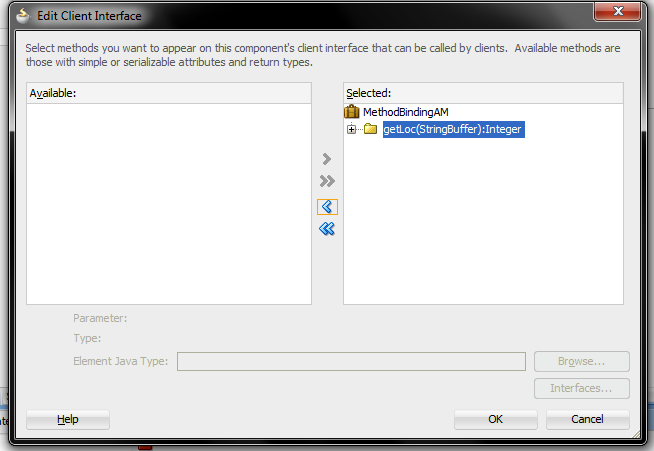
  2. Then go to clientInterface of the AM and add the method to clientInterface.


  3. Then you have to create binding for this method on the page.


  4. Now we have to call this binding and put the parameters in it from the bean.
        public void fetchSalary(ActionEvent actionEvent) {
            OperationBinding binding = getBindings().getOperationBinding("getLoc");
            // to put parameters value in the method
            binding.getParamsMap().put("EmpId", empId);
            Object execute = binding.execute();
            salary  = (Integer) execute;
        }


  5. Now when you run the application.


    and when Fetch Salary button is clicked

  6. You can download the sample application here : MethodBindingApp.rar.
  7. If you have any query regarding this, please write in the comments.